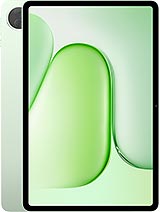
Acer Iconia Tab V12 review
This tablet suits people who read ebooks or PDFs, take handwritten notes with a stylus, or want a large screen for casual media consumption on a tight budget. Anyone expecting gaming performance, a modern processor, or a truly crisp display should shop elsewhere or spend more.
This review is based on Acer’s published specifications and public benchmark data for the Acer Iconia Tab V12, and the rating is spec-based. GoSolo does not physically test devices; where we estimate real-world behaviour such as battery life or charge time, we say so. How we rate phones.
Overview
A 12-inch tablet built for reading, note-taking with the bundled stylus, and casual content consumption rather than gaming. At €290, it makes sense for light daily use on a budget—just don't expect snappy performance or a cutting-edge screen.
Design & Build
At 7.9 mm thick and 595 grams, this tablet is slim and light enough to hold comfortably for extended reading. The glass front and aluminum frame feel reasonable for the price, though they will collect fingerprints and are not as rigid as more expensive alternatives. The built-in three-level kickstand removes the need to buy a separate case for propping up, and stylus support is genuinely useful if you take notes regularly. Nothing here is overwrought, but nothing feels cheap either—it is a workmanlike device.
Display
The 11.97-inch IPS LCD is the main selling point. At 1200 x 2000 pixels, it delivers a comfortable 5:3 aspect ratio that suits reading and document viewing more than a widescreen would. At 195 ppi, the pixel density is adequate but not impressive; fine print is readable, but if you compare it side-by-side to a flagship iPad or Galaxy Tab, you will notice the screen looks softer. The 90Hz refresh rate keeps scrolling through long PDFs or ebooks smooth rather than janky, which matters more on a large screen. Brightness and color accuracy are not specified, but for a €290 tablet aimed at reading, the real-world performance is practical rather than polished.
Performance
The Helio G99 is a capable but dated chip for 2025. It handles everyday apps, email, video calls, and web browsing without hesitation, and will run lighter games like Candy Crush smoothly enough. But anything demanding—3D games, heavy photo editing, or running multiple resource-heavy apps at once—will make the tablet stutter noticeably. The Mali-G57 GPU is particularly weak by today's standards; do not expect to play Genshin Impact or Fortnite at any usable frame rate. For a tablet priced to serve as a reader and note-taking device rather than a gaming machine, this is honest positioning. 8GB of RAM is fine for this workload.
Software
Android 15 ships fresh out of the box, which is a genuine plus for a device at this price. You get the latest version of Android and should expect several years of security updates from Acer. Whether Acer's overlay adds useful features or bloat is hard to say without hands-on time, but the baseline experience should be familiar to anyone who knows Android.
Camera
The 8 MP main camera with autofocus and LED flash is purely functional. It is fine for scanning documents or taking a quick photo of a business card, but do not expect good low-light performance or detailed zooming. The 5 MP selfie camera is adequate for video calls but little else. If photography matters to you at all, this tablet is not it; phone cameras at this price point are far superior.
Battery & Charging
The 8000 mAh battery should deliver about 12 to 14 hours of mixed use—browsing, reading, some video—on a charge. Heavy gaming or continuous video streaming will cut that to around 8 to 10 hours, which is still respectable for a tablet. The spec sheet lists USB Power Delivery but does not state the wattage, so exact charge times are unclear; expect a few hours to full capacity, which is typical for tablets at this price.
Storage & Connectivity
You get 256GB of eMMC storage, which is not cutting-edge but reasonable. eMMC is noticeably slower than the UFS found on pricier tablets, so moving large files around or launching demanding apps will feel sluggish compared to a flagship. The saving grace is a dedicated microSD slot that lets you add up to a terabyte or more of expandable storage for media, books, and downloads. Wi-Fi 6 and Bluetooth 5.2 are solid for its class. There is no cellular connectivity, so you are tied to Wi-Fi—that is fine for a productivity tablet but limits flexibility if you need internet on the go.
Value & Verdict
At €290, the Iconia Tab V12 aims squarely at people who want a big screen for reading, drawing, or light media consumption without breaking the bank. It does not try to be a gaming tablet, a content-creation powerhouse, or an iPad alternative; it is honest about what it is. The Helio G99 is old and weak, the screen is soft, and the cameras are an afterthought. But the size, stylus support, battery life, and expandable storage make it a sensible choice for the price if you know what you are getting into. If you are shopping for a tablet to play games or edit video, keep looking. If you want something large and light for reading, note-taking, and casual web browsing that will not strain your wallet, this lands right in the zone.
Verdict
This tablet suits people who read ebooks or PDFs, take handwritten notes with a stylus, or want a large screen for casual media consumption on a tight budget. Anyone expecting gaming performance, a modern processor, or a truly crisp display should shop elsewhere or spend more.
- Large 12-inch screen with 90Hz refresh rate is comfortable for reading and drawing, especially at its price
- Dedicated microSD slot lets you expand storage by hundreds of gigabytes without sacrifice
- Stylus support and built-in kickstand make it a practical note-taking and media device out of the box
- 8000 mAh battery should comfortably last a full day of casual browsing and reading
- Helio G99 is adequate for apps and video but will choke on any serious gaming or heavy multitasking
- 195 ppi on an 12-inch screen is functional but visibly less sharp than flagship tablets, and eMMC storage is noticeably slower than UFS
- 8 MP camera is more of an afterthought—serviceable for scanning documents, poor for actual photography
Acer Iconia Tab V12 Key Specifications
The essentials at a glance. See the full spec sheet.
| Released | 2025, May 16 |
|---|---|
| Display | 11.97 inches, 407.8 cm2, IPS LCD, 90Hz |
| Resolution | 1200 x 2000 pixels, 5:3 ratio (~195 ppi density) |
| Chipset | Mediatek Helio G99 (6 nm) |
| RAM & storage | 256GB 8GB RAM |
| Main camera | 8 MP, AF |
| Selfie camera | 5 MP |
| Battery | 8000 mAh |
| Charging | USB Power Delivery |
| Software | Android 15 |
| Dimensions | 7.9 mm thickness |
| Weight | 595 g (1.31 lb) |
| Build | Glass front, aluminum frame |
| Durability | Stylus support Built-in three-level kickstand |
| Network | No cellular connectivity |
| NFC | No |
| USB | USB Type-C 2.0 |
Acer Iconia Tab V12 FAQ
Common questions, answered from the spec sheet.
Does the Acer Iconia Tab V12 support 5G?
No. The Acer Iconia Tab V12 tops out at No cellular connectivity, without 5G.
What chipset does the Acer Iconia Tab V12 use?
The Acer Iconia Tab V12 runs on the Mediatek Helio G99 (6 nm).
What display does the Acer Iconia Tab V12 have?
A 11.97 inches, 407.8 cm2 IPS LCD, 90Hz, 1200 x 2000 pixels, 5:3 ratio (~195 ppi density).
How big is the Acer Iconia Tab V12 battery?
The Acer Iconia Tab V12 has a 8000 mAh battery. Charging is rated at USB Power Delivery.
Does the Acer Iconia Tab V12 have NFC?
No, the Acer Iconia Tab V12 does not list NFC support.
Is the Acer Iconia Tab V12 water resistant?
The Acer Iconia Tab V12 carries a Stylus support Built-in three-level kickstand rating.
Does the Acer Iconia Tab V12 support a microSD card?
Yes, the Acer Iconia Tab V12 supports expandable storage (microSDXC (dedicated slot)).
Alternatives to consider
If the Acer Iconia Tab V12 isn’t quite right, these are the closest calls.
Iconia Tab V11
Acer Iconia Tab V11-21M
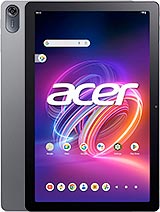
Iconia Tab P10 (2025)
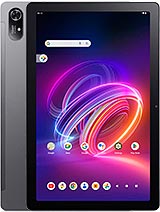
Iconia Tab P11 (2025)
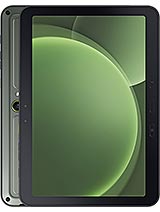
Galaxy Tab Active5 Pro