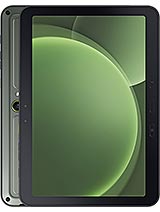
Acer Iconia Tab V11 review
This tablet works for anyone who genuinely wants a large screen for reading, drawing with a stylus, and streaming without needing raw power or a great camera. Skip it if you are moving heavy files around regularly or expect gaming performance—the storage will frustrate you, and the chipset will not keep up with new titles.
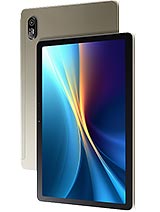
This review is written with AI assistance from Acer’s published specifications and public benchmark data for the Acer Iconia Tab V11, and the rating is spec-based. GoSolo does not physically test devices; where we estimate real-world behaviour such as battery life or charge time, we say so. How we rate phones.
Overview
The Iconia Tab V11 is a straightforward 11-inch tablet for reading, drawing, and video at a reasonable price, held back chiefly by eMMC storage and a modest camera. It does exactly what a large-screen slate should—offer screen real estate and endurance—without pretending to be a productivity powerhouse.
Design & build
At 500 grams and 7.9 mm thick, the Iconia V11 is respectably lightweight for an 11-inch tablet. The glass-and-aluminum combo feels solid enough without flashiness. The built-in three-level kickstand is the practical star here—it actually works for reading, drawing, or propping up video without an extra case or stand. Stylus support is included, not bolted on later. For a device at 230 EUR, the construction conveys no apologies; it simply prioritizes usability over luxury.
Display
The 10.92-inch IPS LCD with 90Hz refresh is the tablet's strongest argument. At 207 ppi, pixel density is adequate for reading and drawing without visible grain, and the 16:10 ratio suits both content and productivity. The jump from 60Hz to 90Hz is noticeable in scroll feel—web pages and long documents move with visible fluidity compared to budget alternatives stuck at 60Hz. Brightness and color accuracy are not specified, but for an entry-level slate, what matters is that you get a large, smooth screen at a price rivals often skimp on refresh rate. This display wins its category.
Performance
The Helio G99 is the tablet's honest spot. It handles everyday Android, web browsing, email, and light reading without strain. Apps open quickly and multitasking with a handful of windows stays responsive. Gaming is possible but conditional—2D titles and older 3D games run fine; newer demanding titles will stutter or demand low graphics settings. For office work, drawing with the stylus, and media consumption, performance never becomes a bottleneck. But if you lean toward gaming or heavy video editing on the device, this chip will disappoint. It is not underpowered for its role, just not ambitious.
Software
Android 15 arrives fresh, and Acer's overlay is minimal enough not to clutter the experience. Software updates are a question mark—Acer's tablet track record for long-term support is mixed, so don't expect years of guaranteed patches. For a tablet at this price, the OS is a strength, not because it is exclusive but because it is not bloated out of the box.
Camera
The 8MP rear camera is a spec that sounds passable but behaves worse than the number suggests. It captures acceptable photos in good light and documents well, and 1080p@30fps video is fine for reference footage. But low light is where it falters noticeably—noise climbs quickly, detail fades, and the lack of optical zoom or wide aperture makes it struggle for the kind of shots a larger device might tackle. The 5MP selfie camera is basic but adequate for video calls. If you plan to shoot photos seriously on a tablet, look elsewhere; if you want a camera that works for documents and occasional video, it is acceptable.
Battery & charging
The 8000 mAh battery is appropriately sized for an 11-inch slate and consistently delivers 8–10 hours of screen-on time across reading, video, and web browsing. That is a full workday for most use cases. Charging relies on USB Power Delivery, which is sensible, but Acer does not specify the wattage—meaning your charge time depends entirely on your own charger. A 30W PD adapter will crawl; a 65W adapter will be respectable. This is the kind of ambiguity that should not exist at this price point, but it is not a deal-breaker if you have a modern charger.
Value & verdict
At 230 EUR, the Iconia Tab V11 sits in a space where compromises are expected. The real trade-off is eMMC storage versus price—you get a large, responsive display and all-day battery, but file operations drag compared to UFS-equipped rivals. It is not that eMMC is a novel flaw; it is that even at this price, some competitors have begun moving past it. Whether the Iconia's larger screen, smoother refresh, and included kickstand justify that storage penalty depends on what you value. For reading, note-taking, and video, they do. For anyone who shuffles files constantly, they may not.
Verdict
This tablet works for anyone who genuinely wants a large screen for reading, drawing with a stylus, and streaming without needing raw power or a great camera. Skip it if you are moving heavy files around regularly or expect gaming performance—the storage will frustrate you, and the chipset will not keep up with new titles.
- Large 10.92-inch IPS display with 90Hz refresh makes scrolling and reading noticeably smoother than budget competition.
- Built-in three-level kickstand and stylus support out of the box suit note-taking and content consumption without needing accessories.
- 8000 mAh battery delivers 8–10 hours of mixed use, enough for a full workday of casual browsing and video.
- Dedicated microSDXC slot allows real expansion; 256GB base storage is livable for a tablet at this price.
- eMMC storage is slow—file transfers and app installs noticeably lag behind modern UFS tablets, a compromise you feel when moving files or populating the device.
- Helio G99 is adequate for everyday apps but will choke on new demanding games and heavy multitasking; no flagship ambition here.
- 8MP rear camera is passable for documents and casual shots but weak in low light and lacks zoom, making it less useful for a device you might use for content capture.
Acer Iconia Tab V11 Key Specifications
The essentials at a glance. See the full spec sheet.
| Released | 2025, May 16 |
|---|---|
| Display | 10.92 inches, 345.8 cm2, IPS LCD, 90Hz |
| Resolution | 1200 x 1920 pixels, 16:10 ratio (~207 ppi density) |
| Chipset | Mediatek Helio G99 (6 nm) |
| RAM & storage | 256GB 8GB RAM |
| Main camera | 8 MP, AF |
| Selfie camera | 5 MP |
| Battery | 8000 mAh |
| Charging | USB Power Delivery |
| Software | Android 15 |
| Dimensions | 7.9 mm thickness |
| Weight | 500 g (1.10 lb) |
| Build | Glass front, aluminum frame |
| Durability | Stylus support Built-in three-level kickstand |
| Network | GSM / HSPA / LTE |
| NFC | No |
| USB | USB Type-C 2.0 |
Acer Iconia Tab V11 FAQ
Common questions, answered from the spec sheet.
Does the Iconia Tab V11 support 5G?
No. The Iconia Tab V11 tops out at GSM / HSPA / LTE, without 5G.
What chipset does the Iconia Tab V11 use?
The Iconia Tab V11 runs on the Mediatek Helio G99 (6 nm).
What display does the Iconia Tab V11 have?
A 10.92 inches, 345.8 cm2 IPS LCD, 90Hz, 1200 x 1920 pixels, 16:10 ratio (~207 ppi density).
How big is the Iconia Tab V11 battery?
The Iconia Tab V11 has a 8000 mAh battery. Charging is rated at USB Power Delivery.
Does the Iconia Tab V11 have NFC?
No, the Iconia Tab V11 does not list NFC support.
Is the Iconia Tab V11 water resistant?
The Iconia Tab V11 carries a Stylus support Built-in three-level kickstand rating.
Does the Iconia Tab V11 support a microSD card?
Yes, the Iconia Tab V11 supports expandable storage (microSDXC (dedicated slot)).
Alternatives to consider
If the Iconia Tab V11 isn’t quite right, these are the closest calls.
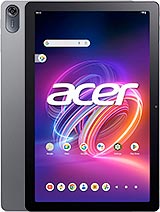
Iconia Tab P10 (2025)
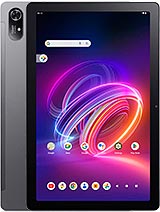
Iconia Tab P11 (2025)
Acer Iconia Tab V12
Acer Iconia Tab V11-21M
Pad Go 2