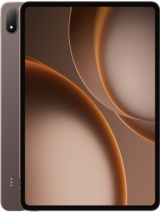
Apple iPad Air 13 2026 review
A genuine professional tablet, not a luxury consumption device. It suits creators and engineers who genuinely edit video, design, or produce music on the move. Casual users and budget shoppers should look elsewhere—even within Apple's lineup, the 11-inch Air or a MacBook at the same price offer better value for non-professional use.
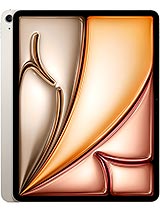
This review is written with AI assistance from Apple’s published specifications and public benchmark data for the Apple iPad Air 13 2026, and the rating is spec-based. GoSolo does not physically test devices; where we estimate real-world behaviour such as battery life or charge time, we say so. How we rate phones.
Overview
The iPad Air 13 is a serious content-creation tool, not a tablet for casual browsing. Its M4 chip, 13-inch 4:3 display, and 616-gram frame make it lighter and sharper than a 15-inch laptop, yet capable of professional video editing and CAD work—if you can justify 850 EUR for a device that won't replace your phone or your main computer.
Design & build
At 6.1mm thick and 616 grams, the Air 13 splits the difference between portability and screen real estate. The glass front and aluminum frame feel rigid without being heavy, making it genuinely lighter to hold and carry than a 15-inch laptop—a real advantage for someone who moves between desk and meeting room. The oleophobic coating keeps fingerprints at bay, and the Mohs 4 scratch-resistant glass is adequate for a desk and bag, though it will show wear over months without a case. The stylus support is there for note-takers and designers, though Apple charges separately for the pencil and both first- and second-gen versions work, which feels deliberately fragmented.
Display
The 2048×2732 4:3 Liquid Retina IPS LCD is tuned for work, not spectacle. At 264 ppi the pixel density is sharp enough for text and spreadsheets at typical viewing distance. The 4:3 ratio and 13-inch size give you breathing room for editing timelines, CAD sketches, and dual windows without the awkward black bars a widescreen tablet forces on document work. The 600-nit brightness is readable in most indoor offices and bright rooms, with the anti-reflective coating helping outdoors, but it trails modern OLED tablets that hit 1000+ nits. For creators editing photos or grading color, this matters: the image will look flatter and less detailed than on an OLED, and the IPS viewing angles, while good, will shift color if you tilt the screen. Realistically, if color accuracy is your job, you're still working on a proper monitor for the final check.
Performance
The M4 with four performance cores, four efficiency cores, and a 9-core GPU is the real story here. This is flagship mobile silicon, the same chip that powers 2026 MacBook Air base models. In practice, that means 4K video editing runs smoothly without stalling, 3D design apps open without lag, and multitrack audio editing is stable even with a dozen instruments and effects loaded. Gaming is smooth, though you won't feel the M4's full muscle there—it's built for professional work that can scale across many cores. The 12GB of RAM is adequate for the workloads this tablet attracts; it doesn't need 16GB or 24GB because the M4's memory efficiency is genuinely good. Compared to last year's M2 iPad Air, this is a real step forward in rendering speed and sustained performance, not a marginal bump.
Software
iPadOS 26.3 is stable and will receive at least five years of updates. For a professional tool, that's reassuring. The OS supports external displays via USB-C, file management is practical for serious work, and apps like Adobe Premiere Rush, Affinity Photo, and GarageBand behave like grown-up tools here, not mobile compromises. That said, iPadOS still lacks some freedoms: no default app choices, limited file system access compared to macOS, and some professional software either doesn't exist or feels half-hearted on iPad. If you need Photoshop, premiere, or Logic, you get them; if you need highly specialized CAD or engineering software, check compatibility first.
Camera
The 12MP f/1.8 main camera with dual pixel PDAF and the 12MP 122-degree front ultrawide are functional and honest, not impressive. The main lens handles document scanning and casual video calls capably; the wide front lens is genuinely useful for video meetings where you want to show your workspace. 4K video up to 60fps suits short clips and live streams, and the gyro-EIS keeps handheld footage steady enough. But the single rear lens and lack of optical zoom or macro focus mean if you're a casual photographer, your phone is likely sharper and more flexible. This tablet is not a camera device; it's a creative tool that happens to have cameras.
Battery & charging
The 9705 mAh battery (36.59 Wh) delivers about 10 to 12 hours of heavy work—video editing, photo processing, music production—before you need a charge. Lighter use stretches it to two days, which is solid for a device this large. The spec sheet is silent on charging speed, which is Apple's way of saying it's not competitive. Assume 20W to 30W wired charging, translating to a 1.5 to 2.5 hour fill from empty. For a device pitched at creators, slow charging feels cheap, especially when rival Android tablets offer 65W+ and wireless charging. It's a friction point if you're juggling projects across multiple devices.
Value & verdict
At 850 EUR, the iPad Air 13 is expensive. A comparable 15-inch MacBook Air M4 costs roughly the same, weighs more, and offers a full OS; a high-end Android tablet with faster charging and OLED runs 200 to 300 EUR less. What you're paying for is portability, the M4's sustained power under load, and Apple's ecosystem if you're already in it. For designers, editors, and architects who move between locations and need something lighter than a laptop but more capable than a phone, it makes sense. For students, casual users, or anyone who can't justify the price against their actual workflow, it's overkill and there are cheaper alternatives that will do the job.
The verdict
This is a tool for professionals who create on the move—video editors, illustrators, architects, musicians. If that's you and you're in Apple's ecosystem, the M4 performance and 4:3 display justify the cost. Everyone else should ask whether they're actually going to do meaningful work on it, or whether a cheaper iPad or a used laptop would serve them better.
Verdict
A genuine professional tablet, not a luxury consumption device. It suits creators and engineers who genuinely edit video, design, or produce music on the move. Casual users and budget shoppers should look elsewhere—even within Apple's lineup, the 11-inch Air or a MacBook at the same price offer better value for non-professional use.
- M4 chip handles professional creative work (video editing, 3D design, music production) without throttling, with room to grow into more demanding apps
- 13-inch 4:3 display in a 616-gram body is genuinely lighter than a 15-inch laptop and better suited to documents and spreadsheets than widescreen tablets
- Wi-Fi 7 and USB-C Gen2 with DisplayPort mean fast file transfers and the ability to drive an external monitor for actual desk work
- Battery lasts a full day of serious editing work; light users will stretch to two days
- 600-nit IPS LCD is readable but noticeably dimmer and less vibrant than OLED alternatives, a real trade-off for creators working on color-critical tasks
- No charging spec listed and no mention of fast charging; typical Apple wireless or 20W wired would be slow for a device this capable
- 12MP cameras are functional for documents and video calls but unremarkable for a 850-EUR device, and the single rear lens limits flexibility
Apple iPad Air 13 2026 Key Specifications
The essentials at a glance. See the full spec sheet.
| Released | 2026, March 02 |
|---|---|
| Display | 13.0 inches, 519.3 cm2 (~86.1% screen-to-body ratio), Liquid Retina IPS LCD, 600 nits (typ) |
| Resolution | 2048 x 2732 pixels, 4:3 ratio (~264 ppi density) |
| Chipset | Apple M4 |
| RAM & storage | 128GB 12GB RAM, 256GB 12GB RAM, 512GB 12GB RAM, 1TB 12GB RAM |
| Main camera | 12 MP, f/1.8, (wide), 1/3.0", 1.22µm, dual pixel PDAF |
| Selfie camera | 12 MP, f/2.0, 122˚ (ultrawide) |
| Battery | 9705 mAh |
| Software | iPadOS 26.3, upgradable to iPadOS 26.4 |
| Dimensions | 280.6 x 214.9 x 6.1 mm (11.05 x 8.46 x 0.24 in) |
| Weight | 616 g (Wi-Fi) / 617 g (5G) (1.36 lb) |
| Build | Glass front, aluminum back, aluminum frame |
| Durability | Stylus support |
| Network | GSM / HSPA / LTE / 5G |
| NFC | No |
| USB | USB Type-C 3.1 Gen2, DisplayPort, magnetic connector |
Apple iPad Air 13 2026 FAQ
Common questions, answered from the spec sheet.
Does the iPad Air 13 2026 support 5G?
Yes. The iPad Air 13 2026 supports 5G networks.
What chipset does the iPad Air 13 2026 use?
The iPad Air 13 2026 runs on the Apple M4.
What display does the iPad Air 13 2026 have?
A 13.0 inches, 519.3 cm2 (~86.1% screen-to-body ratio) Liquid Retina IPS LCD, 600 nits (typ), 2048 x 2732 pixels, 4:3 ratio (~264 ppi density).
How big is the iPad Air 13 2026 battery?
The iPad Air 13 2026 has a 9705 mAh battery.
Does the iPad Air 13 2026 have NFC?
No, the iPad Air 13 2026 does not list NFC support.
Is the iPad Air 13 2026 water resistant?
The iPad Air 13 2026 carries a Stylus support rating.
Does the iPad Air 13 2026 support a microSD card?
No, the iPad Air 13 2026 does not support expandable storage.
Alternatives to consider
If the iPad Air 13 2026 isn’t quite right, these are the closest calls.
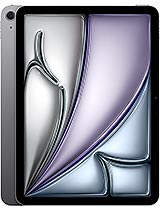
iPad Air 11 2026
![iPad Air 13 (6th generation) [2024] product photo](https://api.mobileapi.dev/devices/879/thumb.png)
iPad Air 13 (6th generation) [2024]
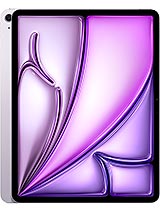
iPad Air 13 2024
iPad 2025
Pad 4