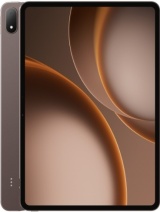
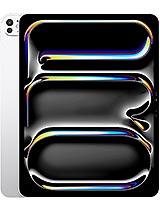
Apple iPad Pro 13 2024 review
This iPad Pro is built for designers, video editors, and illustrators who can justify the price and will use the stylus and OLED screen regularly. Anyone shopping primarily for a media tablet, browsing device, or casual laptop replacement should step down to an iPad Air or even a MacBook—both offer better value for their respective use cases.
This review is based on Apple’s published specifications and public benchmark data for the Apple iPad Pro 13 2024, and the rating is spec-based. GoSolo does not physically test devices; where we estimate real-world behaviour such as battery life or charge time, we say so. How we rate phones.
Overview
The iPad Pro 13 pairs a flagship M4 chip and a stunning 1600-nit OLED display with stylus support and ample RAM for creative work. It is genuinely fast and the screen is exceptional for its size, but at €1550 it's a machine for professionals and serious creators, not a casual tablet buyer.
Design & build
At 579 grams and 5.1 mm thick, the iPad Pro is slim and light for its 13-inch footprint, though it demands a case for any real protection. The glass front and aluminum frame feel solid in hand, and the Nano-texture option on 1TB/2TB models cuts fingerprints and glare effectively. It's not a rugged tool—the Mohs level 4 glass scratches more easily than tempered solutions on cheaper tablets—but for a desk-bound creative, it's durable enough. The eSIM-only connectivity and magnetic USB-C connector are convenient, though you lose flexibility if you need a physical SIM abroad.
Display
This is where the money goes, and it shows. The 13-inch Ultra Retina Tandem OLED hits 1600 nits at peak (1000 nits in high brightness mode), making it one of the brightest tablet screens on the market. The 4:3 aspect ratio and 264 ppi density suit document work and illustration, and the 120Hz refresh keeps stylus input snappy. Colors are accurate for editing, Dolby Vision content looks rich, and outdoor visibility is genuinely excellent—a real strength over LCD rivals. The dual-layer OLED panel is Apple's answer to traditional LED backlights, and it pays off in contrast and smoothness.
Performance
The M4 chip is flagship silicon: the 10-core GPU version (on 1TB/2TB models) runs ProRes video editing, Final Cut Pro, and Adobe apps without stalling, while base models with a 9-core GPU remain swift for most tasks. RAM scales from 8GB to 16GB depending on storage tier, and the 16GB option is essential if you regularly work with 4K timelines or massive Procreate files. Real-world performance is snappy—no noticeable lag in app launches, multitasking, or exports. The gap between this and a MacBook Air M4 is negligible for tablet-native workflows, though you lose a trackpad and keyboard integration.
Software & ecosystem
iPadOS 17.5.1 (upgradable to 26.4) continues to blur the line between tablet and laptop, though it still lacks file management depth and customization compared to macOS. Stylus support is excellent: Procreate, Adobe Fresco, and Clip Studio Paint all respond instantly, and the LiDAR scanner unlocks AR features and precise scanning. The 10,290 mAh battery estimates to 13 to 16 hours of mixed screen-on time—enough for a full creative session or workday without seeking power. However, iPadOS feels like it's holding the hardware back; power users often reach for a MacBook instead because the OS doesn't fully capitalize on the M4's muscle.
Camera
The dual 12MP setup is competent but uninspired. The main camera with f/1.8 aperture and dual-pixel PDAF captures sharp stills and 4K video at up to 60 fps, and the integrated LiDAR scanner excels at document scanning and spatial mapping. The ultrawide selfie lens is useful for video calls and scanning panoramas. But there's no telephoto or meaningful zoom, and the 12MP sensor feels like a tablet afterthought—not a serious content creator's camera. For a €1550 device, this is where Apple cut corners. You would not rely on it for product shots or travel photography.
Battery & charging
The 10,290 mAh battery delivers roughly 13 to 16 hours of mixed use, which is solid for a portable workspace. The charging spec is absent from the data provided, but iPad Pro charging is historically slow (expect 20-30W in practice), so plan for 2-3 hours to refill from empty. For a stationary creative tool, this is less critical than for a phone, but it does mean you cannot quick-charge before a long session. The real-world battery life is reliable: a full day of video editing, illustration, or document work with moderate background use is realistic.
Value & verdict
At €1550 for the entry 256GB model, the iPad Pro 13 is aggressively priced for a tablet but competes directly with a MacBook Air M4 (€1750+). The choice hinges on your workflow: if you live in design apps like Procreate, FCP, or Adobe suite and value the stylus, the iPad's OLED screen and M4 performance are worth it. But if you need general productivity, a MacBook offers more flexibility and a keyboard for half the effort. The storage tiers are a pain—jumping from 256GB to 512GB costs an extra €300, which stings. Professionals upgrading from an older iPad or using this as a dedicated creative screen will find value; casual users or students should look at an iPad Air or entry iPad, which do 80% of the work for far less.
Verdict
This iPad Pro is built for designers, video editors, and illustrators who can justify the price and will use the stylus and OLED screen regularly. Anyone shopping primarily for a media tablet, browsing device, or casual laptop replacement should step down to an iPad Air or even a MacBook—both offer better value for their respective use cases.
- 13-inch OLED screen with 120Hz refresh and 1600-nit peak brightness—excellent for editing, illustration, and working outdoors without squinting.
- M4 chip with 10-core GPU (base models have 9-core) handles ProRes video editing, 3D apps, and Adobe suite without noticeable lag.
- 10,290 mAh battery lasts a full day of heavy creative work—roughly 13 to 16 hours mixed use.
- Stylus support, LiDAR scanner, and Thunderbolt 3 give it real professional chops for video, design, and document workflows.
- Storage is soldered and expensive to jump tiers; base 256GB forces a choice between tight storage and spending €300+ more for 512GB.
- At €1550 for the entry model, it undercuts a MacBook Air M4 by only €200—a genuine trade-off for most buyers.
- Camera system is functional but modest: 12MP wide sensor without meaningful zoom, so it's not a replacement for a phone or camera.
Apple iPad Pro 13 2024 Key Specifications
The essentials at a glance. See the full spec sheet.
| Released | 2024, May 07 |
|---|---|
| Display | 13.0 inches, 527.3 cm2 (~86.9% screen-to-body ratio), Ultra Retina Tandem OLED, 120Hz, HDR10, Dolby Vision, 1000 nits (HBM), 1600 nits (peak) |
| Resolution | 2064 x 2752 pixels, 4:3 ratio (~264 ppi density) |
| Chipset | Apple M4 |
| RAM & storage | 256GB 8GB RAM, 512GB 8GB RAM, 1TB 16GB RAM, 2TB 16GB RAM |
| Main camera | 12 MP, f/1.8, (wide), dual pixel PDAF TOF 3D LiDAR scanner (depth) |
| Selfie camera | 12 MP, f/2.4, 122˚ (ultrawide) |
| Battery | 10290 mAh |
| Software | iPadOS 17.5.1, upgradable to iPadOS 26.4 |
| Dimensions | 281.6 x 215.5 x 5.1 mm (11.09 x 8.48 x 0.20 in) |
| Weight | 579 g (Wi-Fi), 582 g (5G) (1.28 lb) |
| Build | Glass front, aluminum back, aluminum frame |
| Durability | Stylus support |
| Network | GSM / HSPA / LTE / 5G |
| NFC | No |
| USB | USB Type-C 4 (Thunderbolt 3), DisplayPort, magnetic connector |
Apple iPad Pro 13 2024 FAQ
Common questions, answered from the spec sheet.
Does the iPad Pro 13 2024 support 5G?
Yes. The iPad Pro 13 2024 supports 5G networks.
What chipset does the iPad Pro 13 2024 use?
The iPad Pro 13 2024 runs on the Apple M4.
What display does the iPad Pro 13 2024 have?
A 13.0 inches, 527.3 cm2 (~86.9% screen-to-body ratio) Ultra Retina Tandem OLED, 120Hz, HDR10, Dolby Vision, 1000 nits (HBM), 1600 nits (peak), 2064 x 2752 pixels, 4:3 ratio (~264 ppi density).
How big is the iPad Pro 13 2024 battery?
The iPad Pro 13 2024 has a 10290 mAh battery.
Does the iPad Pro 13 2024 have NFC?
No, the iPad Pro 13 2024 does not list NFC support.
Is the iPad Pro 13 2024 water resistant?
The iPad Pro 13 2024 carries a Stylus support rating.
Does the iPad Pro 13 2024 support a microSD card?
No, the iPad Pro 13 2024 does not support expandable storage.
Alternatives to consider
If the iPad Pro 13 2024 isn’t quite right, these are the closest calls.
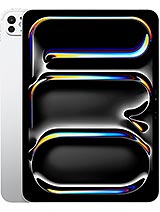
iPad Pro 11 2024
![iPad Pro 13 (7th generation) [2024] product photo](https://api.mobileapi.dev/devices/865/thumb.png)
iPad Pro 13 (7th generation) [2024]

iPad Air 13 2024
![iPad Pro 11-inch (7th generation) [2024] product photo](https://api.mobileapi.dev/devices/873/thumb.png)
iPad Pro 11-inch (7th generation) [2024]
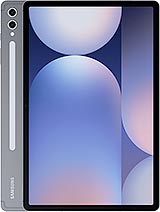
Galaxy Tab S10+