Blackview Zeno 6 Pro review
This tablet suits budget-conscious buyers in regions where iPad is inaccessible or prohibitively priced, and who prioritize screen size and battery life over performance and charging speed. Anyone expecting smooth multitasking, fast charging, or serious photography should look at current-gen competitors or save for a used iPad Air.
This review is based on Blackview’s published specifications and public benchmark data for the Blackview Zeno 6 Pro, and the rating is spec-based. GoSolo does not physically test devices; where we estimate real-world behaviour such as battery life or charge time, we say so. How we rate phones.
Overview
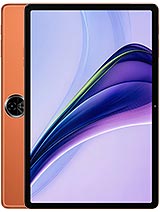
The Zeno 6 Pro is an 11-inch tablet pitched as a budget alternative to iPad that runs Android 16 with stylus support and an 8300 mAh battery. It pairs a modest processor with a large screen and solid battery life, making it serviceable for media and note-taking on a tight budget, though it underperforms rivals in charging speed and raw performance.
Design & build
At 246 x 177mm and 513g, the Zeno 6 Pro feels compact and portable for an 11-inch tablet. The 8.4mm thickness is genuinely slim, and dual nano-SIM support makes it practical for travel or dual-carrier setups. Stylus support is a real draw for note-takers and sketchers — it positions the device as a cheaper alternative to iPad Pro, though the actual stylus experience will depend on hardware responsiveness and software integration. The frame is plastic; that is typical at this price and acceptable, though build feel will not match higher-tier devices.
Display
The 11-inch IPS LCD at 1600 x 2300 pixels delivers 255 ppi, which is sharp enough for text and video at arm's length. At 90Hz, the refresh keeps scrolling smooth in practice. 350 nits peak brightness is below-average for outdoor use, especially in sunlight; indoor and shaded viewing will be fine. The 83.8% screen-to-body ratio is respectable for 2026 and means minimal wasted bezel. This is not an AMOLED or QHD display, so do not expect deep blacks or cinematic pop, but it strikes a fair balance for a budget media tablet.
Performance
The Snapdragon 4 Gen 2 is last-generation entry-level silicon. It handles light browsing, email, and document editing without hiccups, but opening multiple apps in quick succession or running graphically demanding games will cause lag and frame drops. The 8GB RAM (base) or 12GB RAM (higher variant) helps, but the CPU is the bottleneck here. By late 2026, rivals at this price are shipping current-gen entry chips that run notably faster. This tablet suits casual use, streaming, and reading, not gaming or heavy productivity. Expect it to feel noticeably slower than last year's mid-range phones.
Software
Android 16 with DokeOS_P 5 overlay is the latest Google OS with Blackview's own interface layer. DokeOS_P is designed to optimize older hardware, so it should help squeeze more responsiveness from the Snapdragon 4 Gen 2 than stock Android. Stylus integration will depend on app support and driver quality; not all Android apps are tuned for pen input like they are on iPad. FM radio is included, a rarity on modern tablets and useful in regions where it remains a primary media source.
Camera
A single 13 MP f/1.8 main camera and 8 MP selfie handle basic photography and video calls. The rear camera shoots 1440p at 30fps, which is lower than most tablets and smartphones of this generation; 4K has been standard even for budget phones for years. Expect passable quality for documents, low-light weakness, and limited zoom flexibility. The camera is a weak point relative to the price tier and will disappoint anyone expecting to use the tablet as a primary camera device. The 8MP front camera is adequate for Zoom or Teams meetings but not much more.
Battery & charging
The 8300 mAh battery with the Snapdragon 4 Gen 2 should deliver around 2 full days of moderate use — reading, video, browsing. The spec sheet lists 18W charging in the metadata, which is slow by modern standards; rivals at this price often ship 30W or higher, cutting charge time from several hours to under 90 minutes. With no explicit fast-charge marketing, assume a 3+ hour full recharge. USB Type-C is standard and appreciated. Battery longevity over 2–3 years is the real question for a budget device; Blackview's track record here is mixed.
Value & verdict
The Zeno 6 Pro targets buyers who want a large-screen Android tablet for media, note-taking, and light work at a fraction of iPad prices. At this price, it competes against other no-name Chinese tablets and very old iPad models. The stylus support and 90Hz display are legitimate strengths, and the build is respectable. The downsides are real: last-gen processor, slow charging, weak cameras, and modest brightness. For someone in a region where iPad availability or pricing is prohibitive, this is a reasonable compromise. For anyone with access to current-gen entry tablets or willing to stretch for an iPad, the Zeno 6 Pro's age and sluggish performance will grate quickly.
Verdict
This tablet suits budget-conscious buyers in regions where iPad is inaccessible or prohibitively priced, and who prioritize screen size and battery life over performance and charging speed. Anyone expecting smooth multitasking, fast charging, or serious photography should look at current-gen competitors or save for a used iPad Air.
- 11-inch IPS display with 90Hz refresh and 83.8% screen-to-body ratio — good real estate and minimal bezels for a budget tablet
- 8300 mAh battery and entry-level processor should yield two full days of typical use
- Stylus support and microSD slot give it more versatility than many rivals at this price
- Thin and light for its class at 8.4mm and 513g
- Snapdragon 4 Gen 2 is last-generation and slower than competitors' current-tier entry chips; multitasking and demanding apps will stutter
- No charging speed listed, but at 8300 mAh with no fast-charge mention, full recharge likely takes 3+ hours — rivals have moved to 30W+
- 13 MP main camera and 1440p video are well behind tablet norms; fine for documents and video calls, weak for photos
Blackview Zeno 6 Pro Key Specifications
The essentials at a glance. See the full spec sheet.
| Released | 2026, November |
|---|---|
| Display | 11.0 inches, 366.0 cm2 (~83.8% screen-to-body ratio), IPS LCD, 90Hz, 350 nits |
| Resolution | 1600 x 2300 pixels (~255 ppi density) |
| Chipset | Qualcomm SM4450 Snapdragon 4 Gen 2 (4 nm) |
| RAM & storage | 256GB 8GB RAM, 256GB 12GB RAM |
| Main camera | 13 MP, f/1.8, AF |
| Selfie camera | 8 MP, f/2.0, 1/4.0" |
| Battery | 8300 mAh |
| Software | Android 16, DokeOS_P 5 |
| Dimensions | 246.4 x 177.3 x 8.4 mm (9.70 x 6.98 x 0.33 in) |
| Weight | 513 g (1.13 lb) |
| Durability | Stylus support |
| Network | GSM / HSPA / LTE |
| NFC | No |
| USB | USB Type-C, OTG |
Blackview Zeno 6 Pro FAQ
Common questions, answered from the spec sheet.
Does the Zeno 6 Pro support 5G?
No. The Zeno 6 Pro tops out at GSM / HSPA / LTE, without 5G.
What chipset does the Zeno 6 Pro use?
The Zeno 6 Pro runs on the Qualcomm SM4450 Snapdragon 4 Gen 2 (4 nm).
What display does the Zeno 6 Pro have?
A 11.0 inches, 366.0 cm2 (~83.8% screen-to-body ratio) IPS LCD, 90Hz, 350 nits, 1600 x 2300 pixels (~255 ppi density).
How big is the Zeno 6 Pro battery?
The Zeno 6 Pro has a 8300 mAh battery.
Does the Zeno 6 Pro have NFC?
No, the Zeno 6 Pro does not list NFC support.
Is the Zeno 6 Pro water resistant?
The Zeno 6 Pro carries a Stylus support rating.
Does the Zeno 6 Pro support a microSD card?
Yes, the Zeno 6 Pro supports expandable storage (microSDXC (uses shared SIM slot)).
Alternatives to consider
If the Zeno 6 Pro isn’t quite right, these are the closest calls.
Zeno 6
Rock 2 Pro
Zeno 5
BL7000 Pro
N6x