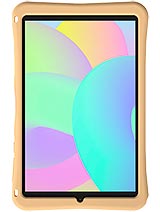
Doogee T20mini Kid review
The T20mini Kid suits parents and educators looking for a portable, lightweight tablet for schoolwork and gentle use; its weak charging speed and entry-level chip rule it out for children who game seriously or need creative software to keep pace with ambition.
This review is based on Doogee’s published specifications and public benchmark data for the Doogee T20mini Kid, and the rating is spec-based. GoSolo does not physically test devices; where we estimate real-world behaviour such as battery life or charge time, we say so. How we rate phones.
Overview
The Doogee T20mini Kid is a lightweight, affordable 8.4-inch tablet pitched at children and built around schoolwork, reading, and gentle entertainment rather than gaming or creative work. The weak processor, sluggish charging, and dim screen are real constraints, but for basic tasks and video calls the hardware is honest and uncluttered.
Design & build
At 499 grams and 12.4 mm thick, this tablet is genuinely pocketable for a child—light enough to carry through a school day without fatigue. The 8.4-inch size sits between a large phone and a standard iPad, striking a practical balance for lap work or handheld use. Build details are sparse in the spec sheet, but the focus on portability over durability is deliberate; this is not a tank. Stylus support is a sensible inclusion that separates it from cheaper alternatives and makes note-taking and sketching feel native rather than clumsy.
Display
The 8.4-inch IPS LCD is sharp enough at 260 ppi for reading and schoolwork without visible pixelation, and the 3:2 aspect ratio is better for documents and web pages than a widescreen tablet. The 350 nit brightness is the real letdown. Indoors, it's perfectly readable; in direct sunlight or bright classrooms, it fades noticeably. For a tablet meant to follow a child around, this is a genuine friction point. The panel itself is not bad for the price, but brightness and outdoor performance lag what you'd want from a device marketed for school use.
Performance
The Unisoc T606 paired with 4GB RAM is entry-level hardware that knows its limits. Light tasks—web browsing, email, PDF reading, basic video calls—run without noticeable lag. YouTube plays smoothly at 720p. But anything heavier stalls: demanding games drop frames, photo editing apps crawl, and heavy multitasking forces visible reloads. This is not a device for a child who wants to edit videos or run complex design tools. The eMMC 5.1 storage is slow by modern standards and compounds the sluggish feel when moving files or launching apps. If the buyer's expectation is schoolwork and reading, the chip is adequate; if they imagine a creative companion or a gaming device, they'll be disappointed quickly.
Software
Android 13 is respectable and not ancient, though a 2023 release on a year-old OS already hints at Doogee's lower priority in the update cycle. No major surprises here, and the absence of heavy customization is actually a benefit. Kids' filtering and parental controls are likely minimal out of the box, which matters if that's a selling point; parents will need third-party apps for screen time management and content blocking. The 128GB storage is enough for schoolwork, some movies, and a modest app library, with microSDXC expansion available (though it shares a SIM slot).
Camera
The 13MP rear camera with LED flash and 1080p video recording are adequate for schoolwork photos, quick documentation, and casual recording. Low-light performance is weak, and zoom crops detail quickly, but for homework photos and video calls the specs are honest. The 5MP front camera is decent for video calls and selfies but adds little beyond basic function. Neither camera is a strength or a hidden gem; they simply do the job. This is not a tablet for photography or vlogging.
Battery & charging
The 5060 mAh battery delivers roughly 8–10 hours of mixed schoolwork, reading, and video—a realistic full day for a child balancing classes and casual entertainment. That is solid. The problem is the 10W charger, which takes 3–4 hours to refill completely. If the tablet dies by evening, you cannot revive it quickly for an hour of homework before bed. For a device meant to live in a school bag, slow charging is a real weakness. A 20W or 30W charger would transform the user experience here, but Doogee has not included it.
Value & verdict
The T20mini Kid sits in an odd middle ground: it's too underpowered for serious creative or gaming work, yet too expensive compared to basic reading tablets or older iPad refunds if you only need schoolwork. For a parent shopping a budget tablet specifically for a child's schoolwork, light reading, and casual video, the light weight, daylong battery, and stylus support offer real value. For anyone who wants to push the hardware or cannot tolerate slow charging, there are better alternatives at similar prices or modest markups. This is a device that knows its audience and mostly delivers, as long as that audience doesn't mind slow charging and can't stomach demanding apps.
Verdict
The T20mini Kid suits parents and educators looking for a portable, lightweight tablet for schoolwork and gentle use; its weak charging speed and entry-level chip rule it out for children who game seriously or need creative software to keep pace with ambition.
- 8.4-inch size and 499g weight make it genuinely portable for a child to hold through a school day without strain.
- 5060 mAh battery yields roughly 8–10 hours of mixed schoolwork and video, enough for a full day without midday panic.
- Stereo speakers and headphone jack are uncommon keeps; useful if the tablet stays away from a desk often.
- Stylus support gives pencil input for notes and sketches without buying a separate accessory.
- 10W charging takes 3–4 hours to refill; too slow for a quick midday top-up between school and evening use.
- Unisoc T606 and 4GB RAM struggle noticeably with any app more demanding than web browsing or light gaming.
- 350 nits brightness washes out quickly in direct sunlight, making outdoor use frustrating.
Doogee T20mini Kid Key Specifications
The essentials at a glance. See the full spec sheet.
| Released | 2023, September |
|---|---|
| Display | 8.4 inches, 209.2 cm2 (~82.1% screen-to-body ratio), IPS LCD, 350 nits |
| Resolution | 1200 x 1820 pixels, 3:2 ratio (~260 ppi density) |
| Chipset | Unisoc T606 (12 nm) |
| RAM & storage | 128GB 4GB RAM |
| Main camera | 13 MP |
| Selfie camera | 5 MP |
| Battery | 5060 mAh |
| Charging | 10W wired |
| Software | Android 13 |
| Dimensions | 202.5 x 125.8 x 12.4 mm (7.97 x 4.95 x 0.49 in) |
| Weight | 499 g (1.10 lb) |
| Durability | Stylus support |
| Network | GSM / HSPA / LTE |
| NFC | No |
| USB | USB Type-C 2.0 |
Doogee T20mini Kid FAQ
Common questions, answered from the spec sheet.
Does the T20mini Kid support 5G?
No. The T20mini Kid tops out at GSM / HSPA / LTE, without 5G.
What chipset does the T20mini Kid use?
The T20mini Kid runs on the Unisoc T606 (12 nm).
What display does the T20mini Kid have?
A 8.4 inches, 209.2 cm2 (~82.1% screen-to-body ratio) IPS LCD, 350 nits, 1200 x 1820 pixels, 3:2 ratio (~260 ppi density).
How big is the T20mini Kid battery?
The T20mini Kid has a 5060 mAh battery. Charging is rated at 10W wired.
Does the T20mini Kid have NFC?
No, the T20mini Kid does not list NFC support.
Is the T20mini Kid water resistant?
The T20mini Kid carries a Stylus support rating.
Does the T20mini Kid support a microSD card?
Yes, the T20mini Kid supports expandable storage (microSDXC (uses shared SIM slot)).
Does the T20mini Kid have a headphone jack?
Yes, the T20mini Kid has a 3.5mm headphone jack.
Alternatives to consider
If the T20mini Kid isn’t quite right, these are the closest calls.
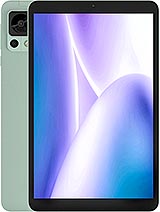
T20mini
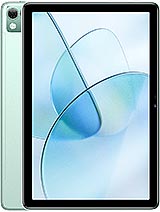
T10S
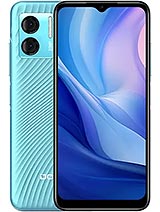
N50S
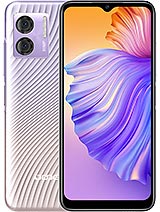
N50
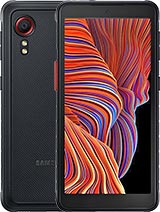
Galaxy XCover 7