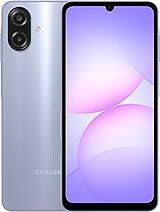
Doogee T40 review
This tablet suits people who read articles, documents, and books on a big screen at home, or who need an affordable second device for browsing and casual media. Skip it if you work outdoors, need fast charging, or want smooth high-end gaming—the dim display and slow charger will frustrate you quickly.
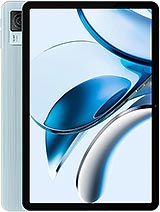
This review is based on Doogee’s published specifications and public benchmark data for the Doogee T40, and the rating is spec-based. GoSolo does not physically test devices; where we estimate real-world behaviour such as battery life or charge time, we say so. How we rate phones.
Overview
The Doogee T40 is an 11-inch tablet aimed at media and reading, armed with a large battery and a modest MediaTek Helio G99 chipset that handles everyday apps but not demanding games. At €320, it's a reasonable value if you want screen real estate on a budget, though the dimmer display and slower charging are real drawbacks for the price.
Design & build
At 530 grams and 7.6 mm thick, the T40 is remarkably compact for an 11-inch tablet. The aluminum frame and back with a glass front feel solid without being heavy, though 530g is still substantial enough that holding it at arm's length for reading becomes tiring after a while. The design is practical and understated, with no fanfare. Stylus support is built in, a feature that usually costs extra on big tablets, and the dual SIM slot shows this is aimed at markets where connectivity flexibility matters. The construction does not feel flimsy, but it also does not claim to be rugged or water-resistant—treat it like a standard tablet.
Display
The 11-inch IPS LCD panel at 1600 by 2560 pixels works well indoors. The 274 ppi density is sufficient for reading and web content at normal viewing distance, and the 16:10 ratio is better suited to documents and landscape media than a 16:9 tablet would be. The problem is brightness: at about 250 nits peak, this screen struggles in sunlight and bright rooms. Indoors with moderate ambient light, it's adequate, but take this outside and you will find yourself squinting or cupping your hand around the bezels. For a tablet in 2024, even budget rivals often push 400 to 500 nits. The color accuracy and viewing angles are typical of IPS—no surprises, but nothing exceptional either.
Performance
The MediaTek Helio G99 is a capable upper-midrange chip that handles Android 14, everyday apps, video streaming, and light office work without lag. Browsing, reading, and video playback are smooth. Gaming is where the limitations surface: you can run games like PUBG Mobile at low settings or Genshin Impact at medium, but sustained play in demanding 3D titles will trigger thermal throttling after 20 to 30 minutes. The 8 GB of RAM keeps multitasking fluid for typical workflows. This is a chip for people who use tablets for content and productivity, not for mobile gaming enthusiasts.
Software
Android 14 comes clean and relatively uncluttered, a refreshing approach from Doogee. There is no deep bloatware, though a few pre-installed apps occupy storage. The interface is responsive and familiar. Stylus integration is basic—the T40 does not ship with complex pressure-sensitive layers or gesture support that you would find on an iPad or Galaxy Tab Pro—but it handles note-taking and sketching adequately for casual use. Doogee's update track record is mixed; expect security patches, but do not bank on major Android upgrades for years to come.
Camera
The 16 MP rear camera and 8 MP front camera are adequate for occasional photos, video calls, and document scanning, but neither is a focus here. Daytime photos are acceptable at 1440p video resolution, and the LED flash helps in low light, but this is not a camera tablet. If photography matters to you, look elsewhere. For the T40's intended use—reading, media, and browsing—the cameras are a practical afterthought rather than a selling point.
Battery & charging
The 8580 mAh battery is the T40's strongest card. In mixed daily use—browsing, reading, video, and light apps—you will see 12 to 14 hours of screen-on time. Heavy video playback cuts that to 10 to 12 hours. Either way, a full day of moderate use is realistic without stress. The charging, however, is the weak spot: 18 W USB Power Delivery tops out at 2.5 to 3.5 hours to full from zero. For a tablet at this price in 2024, when 30W or 45W chargers are standard even on budget models, the slow charge feels like a compromise worth avoiding. If you run low during the day, you will feel the wait.
Value & verdict
At €320, the T40 sits in a competitive space. You get a big screen, long battery life, ample storage, and stylus support—all genuinely useful for reading, documents, and casual media. The trade-offs are real: a dim display that fails outdoors, slow charging, and a processor that cannot handle serious gaming. If you prioritize screen size and battery life over brightness or performance, and your budget is tight, this tablet earns its price. If you spend time outdoors, need to top up quickly, or want a device that runs demanding apps smoothly, look at alternatives with brighter screens or faster chargers. The Helio G99 is not a handicap for office work and streaming, but it is a deliberate choice to keep cost down, and Doogee owns that choice honestly.
Verdict
This tablet suits people who read articles, documents, and books on a big screen at home, or who need an affordable second device for browsing and casual media. Skip it if you work outdoors, need fast charging, or want smooth high-end gaming—the dim display and slow charger will frustrate you quickly.
- 11-inch display with a 16:10 aspect ratio is genuinely useful for reading, documents, and web browsing—far larger than a phone without the bulk of a typical premium tablet
- 8580 mAh battery easily delivers a full day of mixed use, with video playback stretching into a second day
- 512 GB of storage is ample out of the box, and microSD expansion removes the need to choose between apps and media files
- Stylus support adds utility for note-taking and sketching without the steep cost of an iPad or Samsung Galaxy Tab
- 250 nits brightness makes outdoor or bright-room viewing frustrating; direct sunlight reading is nearly impossible
- 18 W charging means 2.5 to 3.5 hours from zero to full, which is slow by 2024 standards even for tablets
- MediaTek Helio G99 throttles in demanding 3D games after 20 to 30 minutes, limiting it to light gaming and everyday apps
Doogee T40 Key Specifications
The essentials at a glance. See the full spec sheet.
| Released | 2024, September |
|---|---|
| Display | 11.0 inches, 350.9 cm2 (~81.4% screen-to-body ratio), IPS LCD |
| Resolution | 1600 x 2560 pixels, 16:10 ratio (~274 ppi density) |
| Chipset | Mediatek Helio G99 (6 nm) |
| RAM & storage | 512GB 8GB RAM |
| Main camera | 16 MP |
| Selfie camera | 8 MP |
| Battery | 8580 mAh |
| Charging | USB Power Delivery up to 18 W |
| Software | Android 14 |
| Dimensions | 256.5 x 168 x 7.6 mm (10.10 x 6.61 x 0.30 in) |
| Weight | 530 g (1.17 lb) |
| Build | Glass front, aluminum frame, aluminum back |
| Durability | Stylus support |
| Network | GSM / HSPA / LTE |
| NFC | No |
| USB | USB Type-C 2.0, OTG, accessory connector |
Doogee T40 FAQ
Common questions, answered from the spec sheet.
Does the T40 support 5G?
No. The T40 tops out at GSM / HSPA / LTE, without 5G.
What chipset does the T40 use?
The T40 runs on the Mediatek Helio G99 (6 nm).
What display does the T40 have?
A 11.0 inches, 350.9 cm2 (~81.4% screen-to-body ratio) IPS LCD, 1600 x 2560 pixels, 16:10 ratio (~274 ppi density).
How big is the T40 battery?
The T40 has a 8580 mAh battery. Charging is rated at USB Power Delivery up to 18 W.
Does the T40 have NFC?
No, the T40 does not list NFC support.
Is the T40 water resistant?
The T40 carries a Stylus support rating.
Does the T40 support a microSD card?
Yes, the T40 supports expandable storage (microSDXC (uses shared SIM slot)).
Alternatives to consider
If the T40 isn’t quite right, these are the closest calls.
T30 Max
T40 Pro
R20
R08
X60