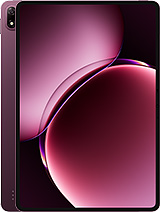
Doogee V Pad review
This tablet suits office workers, students, and remote staff who spend most of their time in email, documents, and web browsing and can tolerate a 2-hour charge. Anyone who games, creates content, or needs a quick top-up before heading out should cross-shop rivals with faster chargers and snappier performance."
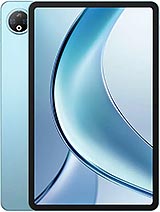
This review is based on Doogee’s published specifications and public benchmark data for the Doogee V Pad, and the rating is spec-based. GoSolo does not physically test devices; where we estimate real-world behaviour such as battery life or charge time, we say so. How we rate phones.
Overview
The Doogee V Pad is a 12-inch Android tablet built for students and office workers who need a large portable screen for documents and video calls, with reliable battery life but hampered by slow 10W charging and a processor that stumbles at demanding tasks. At €350 it undercuts many rivals, but the modest camera, weak performance headroom, and agonizing charge time reveal where the price cuts matter most.
Design & build
At 8 mm thick and 572 grams, the V Pad is one of the slimmer and lighter 12-inch tablets you can buy, and that matters for daily carry. The form factor is straightforward: a long-aspect screen with modest bezels and what appears to be plastic construction, which is par for the budget-tablet course. Mohs level 5 screen protection (essentially no serious hardening) means you should keep a case handy if you are not careful. For an office worker or student slinging this in a bag, the weight and thickness are genuine strengths; the build quality won't impress anyone who has handled premium tablets, but it won't fall apart in normal use either.
Display
The 12-inch IPS LCD panel at 1200 by 2000 pixels works well for its intended audience. 194 ppi is standard for a tablet this size—not as crisp as a high-end iPad, but sharp enough for text, documents, and web pages without obvious pixilation. IPS means viewing angles are wide, which is useful when you are sharing the screen or working from different positions. The 5:3 aspect ratio is practical for documents and productivity apps rather than widescreen movies, and the 83.8% screen-to-body ratio keeps bezels reasonable. Brightness and colour accuracy details are absent from the spec sheet, but for an indoor office or classroom device, this LCD will hold up fine against typical ambient light.
Performance
The MediaTek MT8791 is a mid-range tablet chip designed for everyday apps, not speed runs. With 8 GB of RAM and its octa-core layout (two fast Cortex-A78 cores and six efficiency cores), it handles email, browsing, document editing, and streaming video without lag. Switching between apps is smooth. But if you try to run a demanding 3D game or juggle a dozen background tasks, you will feel the ceiling quickly. For the price, this is about right: expect playable frame rates in lighter games and stutters in intensive ones. Android 15 runs cleanly on it, and 256 GB of storage is sufficient for apps and some offline media, though the microSD slot (which shares the SIM tray) lets you expand if needed.
Software
Android 15 arrives here clean and reasonably bloat-free for a budget tablet. Doogee typically keeps the software near-stock, which means you get regular updates without the lag of a heavily customized skin. No surprises, but no major complaints either—it is standard tablet Android, and that is fine for productivity work. Updates and support timelines for this brand are notoriously vague, so if long-term software commitment matters to you, this should factor into your decision.
Camera
The 13MP rear and 8MP front cameras are functional but nothing more. The rear shooter handles daylight photos with acceptable detail and the LED flash can be useful indoors, but shadow and low-light performance is weak and grainy. There is no optical zoom, macro mode, or ultrawide lens to add versatility. Video tops out at 1080p at 30 fps, which is fine for video calls but nothing special for content creation. If photography or video recording is part of your workflow, you should expect to lean on your phone instead of this tablet; the cameras are here mostly to justify the feature list.
Battery & charging
The 8800 mAh cell is genuinely strong. With mixed use—email, web browsing, video calls, some streaming—expect 12 to 15 hours of screen-on time before hunting for power, which is a full workday or more. That is one of the real reasons to consider this tablet over a 10-inch rival: the endurance is there. Charging is where things sour. 10W is slow by 2025 standards, and the large capacity means it takes roughly 2 hours to go from empty to full. If you forget to charge overnight and need to leave in 30 minutes, you are stuck with a 20% battery. Rivals in this price range are moving to 25W or 30W; the V Pad lags here, and it is a genuine daily frustration.
Connectivity & value
5G modem and Wi-Fi 6 support are welcome at this price point, and dual Nano-SIM slots let you run a work and personal line without carrying two devices. The positioning system covers all major constellations (GPS, Galileo, GLONASS, BDS), which is solid for navigation. At €350, the V Pad lands below many alternatives, and for office workers, students, and media consumers who prioritise a large screen and battery life over speed and camera quality, that price is fair. The trade-offs—slow charging, modest performance, basic cameras—are honest ones; Doogee has not tried to hide them with inflated specs. If your day revolves around email, documents, and video calls, this tablet earns its place. If you want gaming performance, fast charging, or a serious camera, look elsewhere.
Verdict
This tablet suits office workers, students, and remote staff who spend most of their time in email, documents, and web browsing and can tolerate a 2-hour charge. Anyone who games, creates content, or needs a quick top-up before heading out should cross-shop rivals with faster chargers and snappier performance."
- 12-inch display with 194 ppi density is large and sharp enough for reading documents, spreadsheets, and email without straining the eyes over a full workday
- 8800 mAh battery easily lasts 12 to 15 hours of mixed use (browsing, email, some video), making it reliable for travel or extended offline sessions
- 5G, Wi-Fi 6, and dual SIM let you stay connected on fast networks and carry two phone numbers without a second device
- Only 8 mm thick and 572 g keeps it light enough to carry daily without becoming a burden like heavier rivals
- 10W charging is glacially slow; expect roughly 2 hours to fully charge, which is punishing if you are in a hurry
- MT8791 processor handles office apps and streaming smoothly but will stutter in demanding games and heavy multitasking, limiting this as a creative or gaming device
- 13MP rear and 8MP front cameras are basic; low-light shots turn grainy and there is no optical zoom or high-speed video recording
Doogee V Pad Key Specifications
The essentials at a glance. See the full spec sheet.
| Released | 2025, June |
|---|---|
| Display | 12.0 inches, 409.9 cm2 (~83.8% screen-to-body ratio), IPS LCD |
| Resolution | 1200 x 2000 pixels, 5:3 ratio (~194 ppi density) |
| Chipset | Mediatek MT8791 (6 nm) |
| RAM & storage | 256GB 8GB RAM |
| Main camera | 13 MP |
| Selfie camera | 8 MP |
| Battery | 8800 mAh |
| Charging | 10W wired |
| Software | Android 15 |
| Dimensions | 279.5 x 175 x 8 mm (11.00 x 6.89 x 0.31 in) |
| Weight | 572 g (1.26 lb) |
| Network | GSM / HSPA / LTE / 5G |
| NFC | No |
| USB | USB Type-C |
Doogee V Pad FAQ
Common questions, answered from the spec sheet.
Does the V Pad support 5G?
Yes. The V Pad supports 5G networks.
What chipset does the V Pad use?
The V Pad runs on the Mediatek MT8791 (6 nm).
What display does the V Pad have?
A 12.0 inches, 409.9 cm2 (~83.8% screen-to-body ratio) IPS LCD, 1200 x 2000 pixels, 5:3 ratio (~194 ppi density).
How big is the V Pad battery?
The V Pad has a 8800 mAh battery. Charging is rated at 10W wired.
Does the V Pad have NFC?
No, the V Pad does not list NFC support.
Does the V Pad support a microSD card?
Yes, the V Pad supports expandable storage (microSDXC (uses shared SIM slot)).
Does the V Pad have a headphone jack?
No, the V Pad does not have a 3.5mm headphone jack.
Alternatives to consider
If the V Pad isn’t quite right, these are the closest calls.
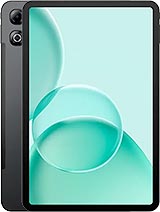
Tab G6 Max
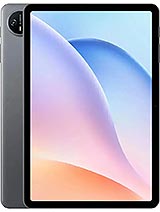
Tab A9
Tab G6
Tab E3 Max
MatePad 11.5 S 2026