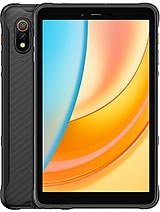
Huawei MatePad Edge review
The MatePad Edge suits office workers and students who prioritize a bright, large screen and portability over gaming power and do not mind a narrower app ecosystem. Buyers who want stylus-first design, cutting-edge processing, or full Google ecosystem integration should look at iPad Air or Samsung's range instead.
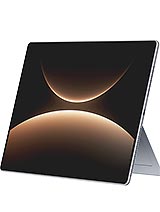
This review is written with AI assistance from Huawei’s published specifications and public benchmark data for the Huawei MatePad Edge, and the rating is spec-based. GoSolo does not physically test devices; where we estimate real-world behaviour such as battery life or charge time, we say so. How we rate phones.
Overview
The MatePad Edge is a slim 14.2-inch OLED tablet built for document work and video, with fast charging and long storage options, but the Kirin X90A is competent rather than class-leading and there's no stylus in the box. It suits buyers who want a large, bright screen at a reasonable mid-range price and do not care about gaming power.
Design & build
At 6.9mm thick and 789g, the MatePad Edge is among the slimmest large tablets on the market. The lightweight frame and kickstand make it easy to move between a desk and a sofa without fatigue, a real advantage over heavier competitors. The metal-and-glass construction feels solid, though Huawei has not published details on drop resistance or screen durability. For a device you'll hold often, the thinness borders on showing off; it is functional, not frivolous.
Display
The 14.2-inch OLED panel is the heart of this device. At 264 pixels per inch and 3120×2080 resolution, text and images are sharp enough that you will not notice pixels at normal viewing distance. The 120Hz refresh makes scrolling through documents or web pages feel immediate rather than laggy, and the 1000-nit peak brightness works well both indoors and in bright daylight. The 3:2 aspect ratio is better suited to office work than entertainment; it leaves useful screen real estate for a sidebar or taskbar. For the price, this is a strong display that justifies the larger footprint.
Performance
The Kirin X90A is Huawei's latest mid-range chip, and it handles the everyday tablet work this device is designed for: email, documents, video playback, and web browsing. Switching between apps is snappy, and the 16GB RAM base tier keeps multitasking smooth. Where it stumbles is demanding gaming and professional video editing; if those are in your workflow, the Kirin will feel slower than a Snapdragon 8 or Apple M-series rival. For $730, you are paying for screen and battery, not raw compute power.
Battery & charging
The 12900mAh battery delivers roughly 8 to 10 hours of mixed use (email, video, web browsing) before you need to plug in, which is a full working day for most. The 140W SuperCharge is fast for a tablet; reaching 100% in under an hour is useful if you need the device ready before leaving the house. That speed does not come free—heat management will be key during back-to-back charge cycles—but for a workstation tablet, the trade-off is reasonable.
Camera
The rear camera pairing (50MP f/1.8 main, 8MP ultrawide) is adequate for document scanning and video calls, but not a strength. The 50MP sensor captures enough detail for most office tasks, and the wide aperture helps in dimmer rooms. However, 4K is limited to 30fps, and there is no telephoto or macro mode. The 32MP front camera is sufficient for video conferencing. Tablets are rarely judged on cameras, and this one does not demand that judgment either.
Software & ecosystem
HarmonyOS 5.1 is Huawei's proprietary OS, and it is stable and well-optimized for this hardware. The trade-off is app availability: you do not have access to Google Play Store, and the Huawei AppGallery is smaller and less varied than Google's or Apple's ecosystems. Productivity apps like Microsoft Office, Adobe Acrobat, and many others are available, but gaming libraries are thinner, and some niche tools may be absent. For a device marketed as a workstation, this narrower ecosystem is a genuine friction point that buyers in the global south should weigh carefully.
Value & verdict
At around 730 EUR, the MatePad Edge occupies a middle ground: too expensive for budget tablet buyers, not powerful or stylus-inclusive enough to outshine iPad Air or Samsung Galaxy Tab S models at the same price. Where it wins is thinness, fast charging, and screen quality for the money. The lack of bundled stylus support is an oversight; at this price tier, rivals include the stylus or offer real savings if they do not. For buyers in markets where access to Google services is unreliable, HarmonyOS is less of a drawback; for those who rely on Play Store, it is a ceiling that matters.
Verdict
The MatePad Edge suits office workers and students who prioritize a bright, large screen and portability over gaming power and do not mind a narrower app ecosystem. Buyers who want stylus-first design, cutting-edge processing, or full Google ecosystem integration should look at iPad Air or Samsung's range instead.
- 14.2-inch OLED display at 264 ppi with 120Hz is sharp and smooth for reading and scrolling; 1000-nit peak brightness works well indoors and outdoors
- Strikingly thin at 6.9mm and light at 789g for its size, making it genuinely portable between rooms and workspaces
- 140W charging refills the 12900mAh battery in under an hour, useful for office and travel scenarios
- Up to 2TB storage and 32GB RAM tiers eliminate any bottleneck for large app libraries or multitasking
- Kirin X90A is a mid-range chip; it handles everyday tablet work but falls short for demanding gaming or heavy video editing compared to Snapdragon or Apple rivals at similar prices
- Stylus sold separately despite being marketed as a key feature; for a tablet at this price, bundling it would have been competitive
- HarmonyOS 5.1 means the app ecosystem outside Google Play is narrower than Android or iPadOS, and some users may find this limiting
Huawei MatePad Edge Key Specifications
The essentials at a glance. See the full spec sheet.
| Released | 2025, November 25 |
|---|---|
| Display | 14.2 inches, 600.4 cm2 (~90.7% screen-to-body ratio), OLED, 1B colors, 120Hz, 1000 nits (peak), HDR Vivid |
| Resolution | 3120 x 2080 pixels, 3:2 ratio (~264 ppi density) |
| Chipset | Kirin X90A |
| RAM & storage | 256GB 16GB RAM, 512GB 16GB RAM, 1TB 24GB RAM, 1TB 24GB RAM SSD, 2TB 32GB RAM SSD |
| Main camera | 50 MP, f/1.8, (wide), PDAF 8 MP, f/2.2, (ultrawide) |
| Selfie camera | 32 MP, f/2.4 |
| Battery | 12900 mAh |
| Charging | SuperCharge up to 140 W |
| Software | HarmonyOS 5.1 |
| Dimensions | 312.1 x 212 x 6.9 mm (12.29 x 8.35 x 0.27 in) |
| Weight | 789 g (1.74 lb) |
| Durability | Stylus support Built-in kickstand |
| Network | No cellular connectivity |
| NFC | No |
| USB | USB Type-C 3.1, OTG |
Huawei MatePad Edge FAQ
Common questions, answered from the spec sheet.
Does the MatePad Edge support 5G?
No. The MatePad Edge tops out at No cellular connectivity, without 5G.
What chipset does the MatePad Edge use?
The MatePad Edge runs on the Kirin X90A.
What display does the MatePad Edge have?
A 14.2 inches, 600.4 cm2 (~90.7% screen-to-body ratio) OLED, 1B colors, 120Hz, 1000 nits (peak), HDR Vivid, 3120 x 2080 pixels, 3:2 ratio (~264 ppi density).
How big is the MatePad Edge battery?
The MatePad Edge has a 12900 mAh battery. Charging is rated at SuperCharge up to 140 W.
Does the MatePad Edge have NFC?
No, the MatePad Edge does not list NFC support.
Is the MatePad Edge water resistant?
The MatePad Edge carries a Stylus support Built-in kickstand rating.
Does the MatePad Edge support a microSD card?
No, the MatePad Edge does not support expandable storage.
Alternatives to consider
If the MatePad Edge isn’t quite right, these are the closest calls.
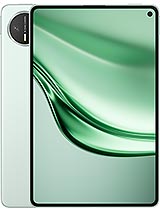
MatePad Mini
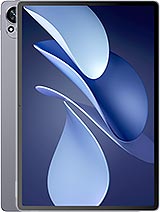
MatePad Air 2025
MatePad 12 X 2025
MatePad 11.5 S 2026
Pad 9 Pro Max