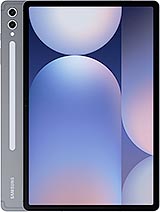
Huawei MatePad Pro 13.2 review
The MatePad Pro 13.2 is a smart buy for people who want a large, light tablet for media, reading, and office work and who are comfortable with Harmony OS's app ecosystem. If you depend on Adobe, Microsoft Office, or niche Western business software, or if you need proven durability certifications, you should look at iPad Pro or Samsung Tab alternatives instead. The OLED display and thin design are genuine strengths, but the app ecosystem is the real sticking point outside China.
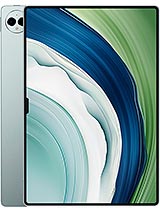
This review is based on Huawei’s published specifications and public benchmark data for the Huawei MatePad Pro 13.2, and the rating is spec-based. GoSolo does not physically test devices; where we estimate real-world behaviour such as battery life or charge time, we say so. How we rate phones.
Overview
The MatePad Pro 13.2 is a slim, light tablet with a bright OLED display and fast charging that works well for media, office, and light creative tasks. Harmony OS remains restrictive outside China, and the camera department is modest for the price, but the thin design and 144Hz screen make it stand out in its size class.
Design & build
At 5.5mm thick and 580g, this tablet punches well above its weight class. For a 13.2-inch device, it is noticeably thinner and lighter than the iPad Pro and most Android rivals, making it genuinely portable if you have a light case and stand. The 91.5% screen-to-body ratio leaves minimal bezel, though Huawei does not publish IP or glass hardness specs, so assume it needs a case for everyday carry. The lack of stated durability certifications is a weakness for a €1000 tablet; rivals at this price often tout water resistance or Gorilla Glass.
Display
The 13.2-inch OLED panel is the standout. 2880 × 1920 pixels at 262 ppi yields sharp text and images; the 3:2 aspect ratio is better suited to office and reading than the squarer iPad Pro for most workflows. Brightness peaks at 1000 nits in HDR content, putting it ahead of most LCD competitors outdoors. The 144Hz refresh rate is genuinely smooth for scrolling and stylus input—noticeable if you draw or take notes regularly. Colors are vivid without the LCD washed-out look, and black levels are true black. The tradeoff is that OLED tablets are rarer in this class, so if you prioritize price over display, rivals are cheaper. For someone who spends 6+ hours a day on the screen, the OLED advantage is real.
Performance
The Kirin 9000S is a capable in-house chip, but it trails the latest Snapdragon and Apple silicon by a generation or so. With up to 16GB RAM and UFS 3.1 storage, it powers everyday tablet work—email, video playback, document editing, light photo work—without stutter. Older game titles run smoothly; newer demanding games may require graphics cuts. The AnTuTu score of 637k is solid for 2023, but by 2026 standards it is aging. For most people, performance is adequate; heavy creatives and mobile gamers should cross-shop current-gen iPad Pro or high-end Android alternatives. Harmony OS itself is smooth and responsive, though app availability outside China is a bigger limiting factor than raw CPU power.
Software
Harmony OS 4.0 is Huawei's own ecosystem, built after Android restrictions forced the company to pivot. It is polished and responsive, with features like multitasking and file management that rival iPadOS. The core issue is app breadth. Outside China, you lose access to Google Play, Adobe Creative Cloud (full suite), Microsoft Office, and many specialized business apps without sideloading or workarounds. If your daily toolkit is WeChat, email, web browsing, and basic office, you are fine. If you rely on Lightroom, Illustrator, or niche industry software, Harmony OS will frustrate you. This is not a flaw in the OS itself; it is a geopolitical reality that affects buying advice. Expect limitations if you live outside China and rely on Western software.
Camera
The 13MP main camera and 8MP ultrawide are adequate for tablets. They handle document scanning, video calls, and casual room shots acceptably. Detail drops if you crop or print beyond a small size, and low-light performance is average at best—typical for a tablet camera. The LED flash helps in dim rooms but does not improve image quality materially. For a €1000 device, the camera package is underwhelming and suggests Huawei prioritized the display and processor. If tablet photography matters to you, consider iPad Pro or high-end Samsung tablets, which offer better zoom and computational photography. For most tablet owners, the camera is a 'nice to have' rather than a decision point, so this may not sway your choice.
Battery & charging
The 10100mAh battery is large for the weight and should deliver a full day of mixed use—reading, video, light work—before needing a charge. Screen-on time depends on brightness and app type; expect roughly 8 to 11 hours at normal settings. The real standout is 88W wired charging: 85% in 40 minutes is genuinely fast and faster than most rivals. There is no wireless charging, which is typical for tablets and not a missing luxury at this price. If you often run the device down mid-day, the fast charging is a practical asset. For people who charge once daily, it matters less.
Connectivity & verdict
Wi-Fi 6 is standard for the price and ensures snappy downloads and cloud sync. Bluetooth 5.2 is stable for headphones and keyboards. USB-C 3.1 with DisplayPort 1.2 lets you output to an external monitor directly from the tablet—rare and genuinely useful for a mobile desk setup. LTE is optional (cellular model available), but coverage depends on your region and carrier support for Huawei bands. The tablet is at its best in a familiar Wi-Fi environment; if you need always-on cellular, confirm your carrier supports the Nano-SIM bands first. No NFC limits contactless payments and certain productivity integrations.
Verdict
The MatePad Pro 13.2 is a smart buy for people who want a large, light tablet for media, reading, and office work and who are comfortable with Harmony OS's app ecosystem. If you depend on Adobe, Microsoft Office, or niche Western business software, or if you need proven durability certifications, you should look at iPad Pro or Samsung Tab alternatives instead. The OLED display and thin design are genuine strengths, but the app ecosystem is the real sticking point outside China.
- OLED display with 144Hz refresh, 1000-nit peak brightness, and 91.5% screen ratio—noticeably smoother and brighter than competitor LCD tablets at this price
- Extremely thin and light (5.5mm, 580g) yet houses a 10100mAh battery; easy to carry compared to heavier iPad Pro rivals
- 88W charging reaches 85% in 40 minutes, substantially faster than rival tablets in the same bracket
- Stylus support and productivity-focused hardware (16GB RAM option, DisplayPort via USB-C) suit creative and office workflows
- Harmony OS has a narrower app ecosystem and fewer productivity integrations outside mainland China compared to iPadOS and Android
- 13MP main camera lacks the detail and low-light performance expected at a €1000 price point; mostly adequate for scanning and calls
- Kirin 9000S, while capable, is not as power-efficient or future-proof as newer flagship chips; demanding games and heavy multitasking may require compromises
Huawei MatePad Pro 13.2 Key Specifications
The essentials at a glance. See the full spec sheet.
| Released | 2023, September 25 |
|---|---|
| Display | 13.2 inches, 518.8 cm2 (~91.5% screen-to-body ratio), OLED, 1B colors, 144Hz, HDR, 1000 nits (peak) |
| Resolution | 2880 x 1920 pixels, 3:2 ratio (~262 ppi density) |
| Chipset | Kirin 9000S (7 nm) |
| RAM & storage | 256GB 12GB RAM, 512GB 12GB RAM, 1TB 16GB RAM |
| Main camera | 13 MP, f/1.8, (wide), PDAF 8 MP, f/2.2, (ultrawide) |
| Selfie camera | 16 MP, f/2.2 TOF 3D, (depth/biometrics sensor) |
| Battery | 10100 mAh |
| Charging | 88W wired, 85% in 40 min |
| Software | Harmony OS 4.0 |
| Dimensions | 289.1 x 196.1 x 5.5 mm (11.38 x 7.72 x 0.22 in) |
| Weight | 580 g (1.28 lb) |
| Durability | Stylus support |
| Network | GSM / HSPA / LTE |
| NFC | No |
| USB | USB Type-C 3.1, OTG, DisplayPort 1.2, accessory connector pins |
Huawei MatePad Pro 13.2 FAQ
Common questions, answered from the spec sheet.
Does the MatePad Pro 13.2 support 5G?
No. The MatePad Pro 13.2 tops out at GSM / HSPA / LTE, without 5G.
What chipset does the MatePad Pro 13.2 use?
The MatePad Pro 13.2 runs on the Kirin 9000S (7 nm).
What display does the MatePad Pro 13.2 have?
A 13.2 inches, 518.8 cm2 (~91.5% screen-to-body ratio) OLED, 1B colors, 144Hz, HDR, 1000 nits (peak), 2880 x 1920 pixels, 3:2 ratio (~262 ppi density).
How big is the MatePad Pro 13.2 battery?
The MatePad Pro 13.2 has a 10100 mAh battery. Charging is rated at 88W wired, 85% in 40 min.
Does the MatePad Pro 13.2 have NFC?
No, the MatePad Pro 13.2 does not list NFC support.
Is the MatePad Pro 13.2 water resistant?
The MatePad Pro 13.2 carries a Stylus support rating.
Does the MatePad Pro 13.2 support a microSD card?
No, the MatePad Pro 13.2 does not support expandable storage.
Does the MatePad Pro 13.2 have a headphone jack?
No, the MatePad Pro 13.2 does not have a 3.5mm headphone jack.
Alternatives to consider
If the MatePad Pro 13.2 isn’t quite right, these are the closest calls.
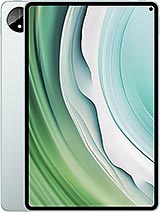
MatePad Pro 11 2024

MatePad Pro 12.2 (2024)
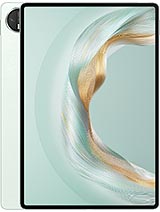
MatePad Pro 12.2
MatePad Air
Pad 3