Kyocera DuraSlate review
The DuraSlate is built for field crews and outdoor workers who need a reliable, indestructible form-filler and document viewer. It is not for consumers seeking a cheap general-purpose tablet or anyone who expects speed, cameras, or mobile data."
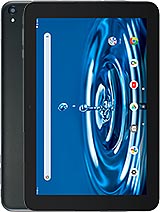
This review is based on Kyocera’s published specifications and public benchmark data for the Kyocera DuraSlate, and the rating is spec-based. GoSolo does not physically test devices; where we estimate real-world behaviour such as battery life or charge time, we say so. How we rate phones.
Overview
The DuraSlate is a rugged 10.1-inch Android tablet built for field workers and outdoor crews, not consumers. Its durability—IP68, drop-proof to 1.5m—and long battery life matter far more than its dated Helio P35 chipset or dim camera specs.
Design & build
At 488 grams and 8.6 mm thin, the DuraSlate is a solidly built device that feels heavier than most tablets but not uncomfortably so for lap or desk use. The IP68 rating and 1.5-meter drop resistance set it apart from consumer tablets; it survives submersion in water for 30 minutes and can withstand shoulder-height falls without cracking. Dragontrail Pro Glass protects the display. For a tablet meant for construction sites, warehouses, and fieldwork crews, this durability is not a luxury—it is the whole point. Most consumer tablets would need replacement after a few months in similar conditions.
Display
The 10.1-inch IPS LCD runs at 1200 × 1920 pixels (16:10 ratio, 224 ppi). That pixel density is adequate; text reads clearly at a normal viewing distance, and there is no visible pixelation for a tablet of this size. The screen-to-body ratio of 68 percent is ordinary for a rugged device—the chunky bezels exist partly for durability and grip. Colors are neutral and viewing angles are wide, as IPS panels deliver. For fieldwork forms, spreadsheets, and document review, this display is fit for purpose. It is not built for photo editing or entertainment, and nobody shopping this tablet expects otherwise.
Performance
The Mediatek MT6765 Helio P35 is a dated chipset even for 2023; it is entry-level and shows it. With 3GB of RAM and UFS 2.2 storage, the DuraSlate handles light web browsing, email, document apps, and basic multitasking without strain. Open two or three demanding apps, switch between them quickly, or attempt anything resembling casual mobile gaming, and you will hit lag and stutters. Android 12 runs smoothly enough for the work it is designed to do, but do not mistake this tablet for a productivity machine. It is a durable form-filler and document viewer, not a laptop alternative. For that tier of use, the chip is fine. For anything else, it is a bottleneck.
Camera
An 8MP main camera with f/2.4 aperture and no autofocus handles document scanning and basic photos, but that is about it. The lack of autofocus is the real limiter; distant subjects or small details will be soft or blurry. The 5MP selfie camera is cosmetic. Neither camera is a strength. If you need reliable photo capture for site documentation, a dedicated smartphone or camera serves you far better. The DuraSlate's cameras exist to tick a box, not to impress.
Battery & charging
The 7000 mAh battery is the DuraSlate's most practical asset. In everyday mixed use on the 10.1-inch screen, expect 8 to 10 hours before needing a charge, which covers a typical work shift. The 45W USB Power Delivery charger refills the battery in roughly 60 to 90 minutes, making it reasonable for overnight or short breaks. For a tablet intended to follow you all day on a job site, this endurance is crucial. No fast-charging tricks; just reliable, predictable stamina.
Software & connectivity
Android 12 is two years old as of release, and there is no word on upgrade roadmap. For a rugged device sold to enterprises and field crews, that is less of a concern than it would be for a consumer tablet; updates matter less than stability and long-term support. Wi-Fi 6E and Bluetooth 5.1 are present, but no cellular connectivity at all. This is a Wi-Fi-only device, which is a significant limitation in areas without coverage or if you need mobile data while in the field. GPS, Galileo, Glonass, and Beidou positioning work as long as you have a data connection elsewhere for maps or location services.
Value & verdict
At roughly 360 EUR, the DuraSlate is not cheap, but pricing reflects the rugged engineering and long-term durability you get. For a consumer buying a regular tablet to read and stream, it is overpriced. For a business buying tablets for outdoor teams—construction, utilities, field surveys, logistics—it is correctly priced. The tablet trades consumer-friendly features (a faster chipset, better cameras, cellular) for traits that matter on job sites: waterproofing, drop resistance, and all-day battery. It is a tool, not a lifestyle purchase. Buy it if your tablet needs to survive mud, rain, and accidental drops. Skip it if you want an affordable do-everything tablet for home use.
Verdict
The DuraSlate is built for field crews and outdoor workers who need a reliable, indestructible form-filler and document viewer. It is not for consumers seeking a cheap general-purpose tablet or anyone who expects speed, cameras, or mobile data."
- IP68 rating and 1.5m drop resistance make it genuinely fit for muddy, wet, or industrial environments where most tablets would fail within days
- 7000 mAh battery delivers a full working day on mixed use; 45W charging tops it in an hour and a half
- 10.1-inch 224 ppi display is large and clear enough for forms, documents, and fieldwork without strain
- Dedicated microSD slot allows easy expansion beyond the tight 32GB base storage
- Helio P35 and 3GB RAM are underpowered for anything beyond light browsing and document apps; heavy multitasking or video lags noticeably
- No cellular connectivity means it is Wi-Fi only, limiting use in areas without coverage
- 8MP camera lacks autofocus, making it unsuitable for detailed captures or anything beyond basic document scanning
Kyocera DuraSlate Key Specifications
The essentials at a glance. See the full spec sheet.
| Released | 2023, October |
|---|---|
| Display | 10.1 inches, 295.8 cm2 (~68.0% screen-to-body ratio), IPS LCD |
| Resolution | 1200 x 1920 pixels, 16:10 ratio (~224 ppi density) |
| Chipset | Mediatek MT6765 Helio P35 (12 nm) |
| RAM & storage | 32GB 3GB RAM |
| Main camera | 8 MP, f/2.4, (wide), 1/4.0", 1.12µm, AF |
| Selfie camera | 5 MP, f/2.4 |
| Battery | 7000 mAh |
| Charging | 45W wired, PD2 |
| Software | Android 12 |
| Dimensions | 259 x 168 x 8.6 mm (10.20 x 6.61 x 0.34 in) |
| Weight | 488 g (1.08 lb) |
| Durability | IP68 dust tight and water resistant (immersible up to 1.5m for 30 min) Drop resistant up to 1.5m |
| Network | No cellular connectivity |
| NFC | No |
| USB | USB Type-C 2.0 |
Kyocera DuraSlate FAQ
Common questions, answered from the spec sheet.
Does the DuraSlate support 5G?
No. The DuraSlate tops out at No cellular connectivity, without 5G.
What chipset does the DuraSlate use?
The DuraSlate runs on the Mediatek MT6765 Helio P35 (12 nm).
What display does the DuraSlate have?
A 10.1 inches, 295.8 cm2 (~68.0% screen-to-body ratio) IPS LCD, 1200 x 1920 pixels, 16:10 ratio (~224 ppi density).
How big is the DuraSlate battery?
The DuraSlate has a 7000 mAh battery. Charging is rated at 45W wired, PD2.
Does the DuraSlate have NFC?
No, the DuraSlate does not list NFC support.
Is the DuraSlate water resistant?
The DuraSlate carries a IP68 dust tight and water resistant (immersible up to 1.5m for 30 min) Drop resistant up to 1.5m rating.
Does the DuraSlate support a microSD card?
Yes, the DuraSlate supports expandable storage (microSDXC (dedicated slot)).
Does the DuraSlate have a headphone jack?
Yes, the DuraSlate has a 3.5mm headphone jack.
Alternatives to consider
If the DuraSlate isn’t quite right, these are the closest calls.
DuraSport UW
DuraForce Pro 3

Digno SX3

DuraForce EX WiFi
Galaxy XCover 7