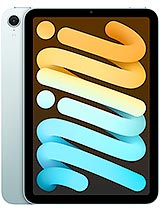
OnePlus Pad 3 review
Pick this if you want a large, light tablet for media and productivity without paying flagship prices, and you are comfortable using Wi-Fi and a phone for connectivity. Look elsewhere if stylus work is core to your plan, you need cellular backup, or you expect cameras that rival a phone.
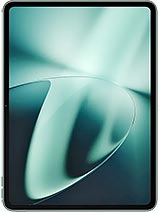
This review is based on OnePlus’s published specifications and public benchmark data for the OnePlus Pad 3, and the rating is spec-based. GoSolo does not physically test devices; where we estimate real-world behaviour such as battery life or charge time, we say so. How we rate phones.
Overview
The OnePlus Pad 3 is a clean tablet for reading, media, and light work, with a sharp 144Hz screen and two-day battery life at an honest price. It won't impress anyone who expects stylus features, gaming grunt, or cellular connectivity, but it doesn't pretend to.
Design & build
At 552 grams and 6.5 millimeters thick, the Pad 3 is genuinely portable—lighter and slimmer than most rivals at this size. The aluminum chassis and glass front feel solid without being heavy. The 84% screen-to-body ratio is respectable, though the bezels are wide enough that you will not mistake this for a modern flagship. The real catch is that while the spec sheet mentions stylus support, OnePlus does not bundle one, so any digital note-taking or drawing demands a third-party purchase. That is a meaningful omission for a tablet pitched at productivity.
Display
The 11.6-inch LCD screen runs at 2000 by 2800 pixels and 144Hz, which is where this tablet starts to matter. That refresh rate keeps scrolling and page-turning visibly smooth, a genuine upgrade over the 60Hz norm two years ago. The 500-nit typical brightness is decent indoors and serviceable in partial sunlight, though direct outdoor reading will strain slightly. HDR10+ and Dolby Vision support sound impressive on paper but land softly in practice—streaming video looks composed and colorful, not dramatic. The IPS panel won't give you OLED's contrast punch, but for a tablet in the €500 range, the screen is the strongest piece of hardware here.
Performance
The Dimensity 9000 is a high-end chip for its era, and it proves the point here: apps open smartly, multitasking does not stutter, and video streaming plays without hiccups. Web browsing is fluid, document editing in productivity apps feels snappy, and casual games run without complaint. Demanding 3D games at high detail will see frame drops, and that is the only honest ceiling—but if your tablet life is email, spreadsheets, reading, and YouTube, this silicon delivers. The 8GB or 12GB RAM options both handle the workload comfortably; the higher tier is overkill unless you fill 20 browser tabs and three apps at once.
Software
OxygenOS 15 on top of Android ships clean and responsive, with few bloat apps getting in the way. Updates run up to Android 15, giving you several years of support before the software feels dated. OnePlus keeps the tablet interface lean—it is Android, not a walled garden—which means you get the full app store but also the responsibility to sideload or hunt for tablet-optimized versions of apps. The refresh rate plays nice here; animation feels natural rather than jarring, and scroll performance is where you notice the 144Hz investment most.
Camera
The 13-megapixel rear and 8-megapixel front cameras are an afterthought. Both shoot soft, low-contrast images in bright light and fumble in anything dimmer. 4K video at 30fps is technically capable but looks mushy compared to what a midrange phone delivers. If your tablet's main camera job is video calls, these lenses are tolerable; if you plan to shoot photos or video, you will wish you had brought your phone instead. This is where the Pad 3 cuts costs that show.
Battery & charging
The 9510 mAh battery is the tablet's secret weapon. On a realistic mix of browsing, video, reading, and email, expect 16 to 18 hours of screen-on time, easily stretching past two full days on lighter use. That matters for a device you might take on a trip or use without an outlet nearby. The 67W charger tops the battery from empty to full in about 40 to 45 minutes—genuinely fast and useful if you need the tablet ready before you leave. Standby time is solid; the tablet will keep charge for days if you leave it.
Value & verdict
At around €500, the Pad 3 lands in a crowded middle ground. You get a sharp, responsive screen, a processor that keeps up, excellent stamina, and a body light enough to carry. Against that: no cellular option, no stylus in the box, weak cameras, and a 2023 release date that feels distant now in 2026. For readers, students, and people who stream and browse, this tablet offers genuine value. It will not replace your phone, and it will not turn you into an artist without a stylus purchase. It is straightforward—a screen and battery you can take everywhere, running apps smoothly, and asking little of you in return.
Verdict
Pick this if you want a large, light tablet for media and productivity without paying flagship prices, and you are comfortable using Wi-Fi and a phone for connectivity. Look elsewhere if stylus work is core to your plan, you need cellular backup, or you expect cameras that rival a phone.
- 11.6-inch 144Hz display that stays readable and responsive across casual and productivity tasks
- All-day-plus battery life from the 9510 mAh cell, easily reaching two days of mixed use
- Thin, light aluminum design at 552g and 6.5mm thickness, genuinely portable for a tablet this size
- 67W charging gets the battery back to full in roughly 45 minutes, practical for work and travel
- No stylus included despite listed support, requiring a separate purchase that eats into value
- No cellular option limits tethering and on-the-go connectivity to Wi-Fi only
- Cameras are well below tablet standards: 13MP rear and 8MP front shoot soft video even in good light
OnePlus Pad 3 Key Specifications
The essentials at a glance. See the full spec sheet.
| Released | 2023, February 07 |
|---|---|
| Display | 11.61 inches, 411.3 cm2 (~84.2% screen-to-body ratio), IPS LCD, 1B colors, Dolby Vision, HDR10+, 144Hz, 500 nits (typ) |
| Resolution | 2000 x 2800 pixels (~296 ppi density) |
| Chipset | Mediatek Dimensity 9000 (4 nm) |
| RAM & storage | 128GB 8GB RAM, 256GB 12GB RAM |
| Main camera | 13 MP, f/2.2, 23mm (wide) |
| Selfie camera | 8 MP, f/2.3, (wide), 1/4.0", 1.12µm |
| Battery | 9510 mAh |
| Charging | 67W wired, PD, QC, UFCS |
| Software | Android 13, upgradable to Android 15, OxygenOS 15 |
| Dimensions | 258 x 189.4 x 6.5 mm (10.16 x 7.46 x 0.26 in) |
| Weight | 552 g (1.22 lb) |
| Build | Glass front, aluminum back, aluminum frame |
| Durability | Stylus support |
| Network | No cellular connectivity |
| NFC | No |
| USB | USB Type-C 2.0, OTG, accessory connector |
OnePlus Pad 3 FAQ
Common questions, answered from the spec sheet.
Does the Pad 3 support 5G?
No. The Pad 3 tops out at No cellular connectivity, without 5G.
What chipset does the Pad 3 use?
The Pad 3 runs on the Mediatek Dimensity 9000 (4 nm).
What display does the Pad 3 have?
A 11.61 inches, 411.3 cm2 (~84.2% screen-to-body ratio) IPS LCD, 1B colors, Dolby Vision, HDR10+, 144Hz, 500 nits (typ), 2000 x 2800 pixels (~296 ppi density).
How big is the Pad 3 battery?
The Pad 3 has a 9510 mAh battery. Charging is rated at 67W wired, PD, QC, UFCS.
Does the Pad 3 have NFC?
No, the Pad 3 does not list NFC support.
Is the Pad 3 water resistant?
The Pad 3 carries a Stylus support rating.
Does the Pad 3 support a microSD card?
No, the Pad 3 does not support expandable storage.
Does the Pad 3 have a headphone jack?
No, the Pad 3 does not have a 3.5mm headphone jack.
Alternatives to consider
If the Pad 3 isn’t quite right, these are the closest calls.
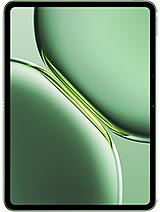
Pad Pro
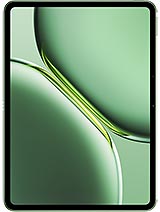
Pad 2 Pro

Pad OPD2407
Pad 2 China
Pad 6S Pro 12.4