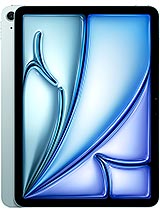
OnePlus Pad Pro review
The Pad Pro suits anyone hunting a lightweight, speedy tablet for gaming, video, and daily browsing who can live without stylus integration. Pass if pen input or class-leading tablet cameras factor into your choice.

This review is based on OnePlus’s published specifications and public benchmark data for the OnePlus Pad Pro, and the rating is spec-based. GoSolo does not physically test devices; where we estimate real-world behaviour such as battery life or charge time, we say so. How we rate phones.
Overview
The OnePlus Pad Pro is a slim, fast tablet for multimedia and gaming that does those jobs well, but its modest cameras and lack of a stylus bundle feel like oversights for a 370-euro flagship tablet.
Design and Build
At 584 grams and 6.5mm thick, the Pad Pro feels light and slim for its 12.1-inch class. The glass front, aluminum frame, and aluminum back give it a rigidity you'd want from a tablet that size, though glass makes it fingerprint-prone and a drop hazard. The form factor is comfortable for lap use and one-handed navigation in portrait; size-wise it sits between a large phone and a 13-inch laptop. Industrial design is clean and unremarkable, which for a tablet means it steps out of the way. The green color option is a nice departure from the usual gray and silver, but neither hue is dramatic.
Display
The 12.1-inch, 2120×3000 144Hz IPS LCD is the Pad Pro's strongest visual asset. Pixel density of 304 ppi keeps text sharp at typical viewing distance, and the 144Hz refresh makes scrolling through feeds, web pages, and apps noticeably smoother than the 60Hz standard you still see on many budget tablets. Peak brightness of 900 nits is enough to read outdoors in direct sun—a genuine quality-of-life feature for a device this large. Dolby Vision and HDR10+ support means video content looks rich, though the IPS panel loses the deep blacks and contrast you'd get from OLED. For gaming and video, this screen delivers; for all-day reading or creative work in dim light, OLED tablets elsewhere in the market would feel less fatiguing over hours.
Performance
The Snapdragon 8 Gen 3 with Adreno 750 is current-gen flagship silicon, and it shows. Genshin Impact runs smoothly at high graphical settings without stuttering, and switching between dozens of apps and browser tabs doesn't trigger forced reloads. The 8GB base RAM handles normal multitasking fine, but if you plan heavy load—3D modeling, dozens of open tabs, or concurrent video calls—stepping to 12GB or 16GB RAM removes any doubt. For most users' actual tablet work (streaming, social media, light productivity, games), this chipset is overkill in the best way: zero friction, no waiting. An entry-level chip would lag noticeably; this one leaves zero performance complaints.
Software
OxygenOS 14.1 on Android 14 runs clean and close to stock, which OnePlus devotees appreciate. The tablet layout spreads apps and split-screen windows intuitively across the wider canvas, and multitasking gestures feel natural. Updates are fairly prompt, though OnePlus's promise of five years of major Android releases is notable if not exceptional by 2024 standards. No bloatware clutter, which keeps the experience brisk. File management and system settings are straightforward, and if you live in OnePlus's ecosystem (other OnePlus devices, OxygenOS phones), continuity features like file sharing and app notification sync work seamlessly.
Camera
A 13MP main camera and 8MP selfie lens are genuinely basic by 2024 standards, even for tablets. The 13MP sensor with LED flash is fine for quick snaps or occasional document scanning, but low-light shots are grainy and detail retention is soft. The 8MP front camera struggles with video calls on higher brightness settings, and while video stabilization via gyro helps, 1080p@30fps output and narrow dynamic range make Zoom or Teams calls look worse than what rivals' 12MP or 13MP front lenses deliver. Tablets aren't primary camera devices, so this rarely matters in real use; most people reach for a phone. That said, at this price point and against iPad Pro or Samsung Tab S rivals, the Pad Pro's camera hardware is clearly a compromise.
Battery and Charging
The 9510mAh battery is substantial, and real-world screen-on time in mixed use (browsing, video, messaging, light gaming) reaches 8–10 hours—enough for a full workday without hunting for an outlet. Heavy gaming or video editing cuts this closer to 6–7 hours, which is expected. The 67W SuperVOOC charger reaches a full charge in roughly 50–65 minutes, fast enough to refuel before leaving home or the office. That charge speed is good for a tablet, though not exceptional; flagships in the phone space have moved to 100W and beyond, so the Pad Pro feels ordinary rather than standout here. Battery health should hold up well over two years of typical use, given OnePlus's usually solid battery management in OxygenOS.
Value and Verdict
At about 370 euros, the OnePlus Pad Pro is a compelling option if your primary interests are gaming, video consumption, and web browsing on a large, fast screen. The 144Hz display, flagship silicon, and all-day battery make it a worthy alternative to the standard iPad Air or Samsung's non-ultra Tab S models, especially in markets where OnePlus pricing is aggressive. The obvious gap is the omission of a bundled stylus or stylus optimization; if handwriting, sketching, or note-taking is a priority, you're paying 100+ euros extra for a stylus and then trusting OnePlus's software support for pen features. The cameras are also genuinely weak for a flagship tablet, though this matters far less than on phones. If you want a fast, slim tablet for entertainment and productivity that plays nicely with OnePlus devices and doesn't demand pen input, the Pad Pro is solid. If you lean on a stylus, have large camera files to manage, or crave OLED contrast, look at iPad Pro or the premium Samsung Tab S Ultra instead.
Verdict
The Pad Pro suits anyone hunting a lightweight, speedy tablet for gaming, video, and daily browsing who can live without stylus integration. Pass if pen input or class-leading tablet cameras factor into your choice.
- 144Hz LCD display with 900-nit peaks keeps scrolling smooth and content visible in bright light, rare for a non-iPad tablet at this price
- Snapdragon 8 Gen 3 handles demanding games and multitasking without lag; the Adreno 750 graphics push high settings in Genshin Impact and mobile shooters
- 9510mAh battery delivers a genuine 8–10 hours of screen-on mixed use; full 67W charging refills the tank in under an hour
- Only 6.5mm thick and 584g makes it genuinely portable for a 12.1-inch device; the glass and aluminum build feels solid without being fragile
- 13MP main camera and 8MP selfie are weak for 2024; tablet cameras rarely matter much in daily use, but rivals at this price offer sharper stills and video, especially for Zoom calls
- No stylus included or tuned for pen input, despite stylus support and competing against iPad Pro and Samsung Tab S models that include or deeply optimize for one
- IPS LCD ages faster than OLED rivals; blacks are less inky and power efficiency lags, though brightness and color here are still solid
OnePlus Pad Pro Key Specifications
The essentials at a glance. See the full spec sheet.
| Released | 2024, June 27 |
|---|---|
| Display | 12.1 inches, 445.2 cm2 (~84.9% screen-to-body ratio), IPS LCD, 68B colors, Dolby Vision, HDR10+, 144Hz, 600 nits (typ), 900 nits (peak) |
| Resolution | 2120 x 3000 pixels (~304 ppi density) |
| Chipset | Qualcomm SM8650-AB Snapdragon 8 Gen 3 (4 nm) |
| RAM & storage | 128GB 8GB RAM, 256GB 8GB RAM, 256GB 12GB RAM, 512GB 16GB RAM |
| Main camera | 13 MP, f/2.2, 23mm (wide) |
| Selfie camera | 8 MP, f/2.3, (wide), 1/4.0", 1.12µm |
| Battery | 9510 mAh |
| Charging | SuperVOOC up to 67 W |
| Software | Android 14, OxygenOS 14.1 |
| Dimensions | 268.7 x 195.1 x 6.5 mm (10.58 x 7.68 x 0.26 in) |
| Weight | 584 g (1.29 lb) |
| Build | Glass front, aluminum back, aluminum frame |
| Durability | Stylus support |
| Network | No cellular connectivity |
| NFC | NFC (data sharing only) |
| USB | USB Type-C 3.2, OTG, accessory connector |
OnePlus Pad Pro FAQ
Common questions, answered from the spec sheet.
Does the Pad Pro support 5G?
No. The Pad Pro tops out at No cellular connectivity, without 5G.
What chipset does the Pad Pro use?
The Pad Pro runs on the Qualcomm SM8650-AB Snapdragon 8 Gen 3 (4 nm).
What display does the Pad Pro have?
A 12.1 inches, 445.2 cm2 (~84.9% screen-to-body ratio) IPS LCD, 68B colors, Dolby Vision, HDR10+, 144Hz, 600 nits (typ), 900 nits (peak), 2120 x 3000 pixels (~304 ppi density).
How big is the Pad Pro battery?
The Pad Pro has a 9510 mAh battery. Charging is rated at SuperVOOC up to 67 W.
Does the Pad Pro have NFC?
Yes, the Pad Pro has NFC.
Is the Pad Pro water resistant?
The Pad Pro carries a Stylus support rating.
Does the Pad Pro support a microSD card?
No, the Pad Pro does not support expandable storage.
Alternatives to consider
If the Pad Pro isn’t quite right, these are the closest calls.

Pad 2 Pro
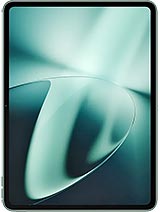
Pad 3

Pad OPD2407
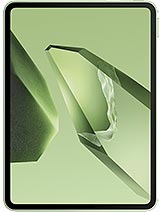
Pad 2 China
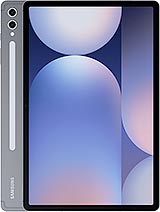
Galaxy Tab S10+