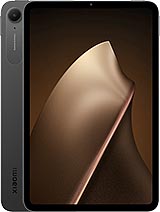
Oppo Pad 4 Pro review
This tablet suits anyone doing long-form reading, document editing, and stylus note-taking in a WiFi-connected environment who values a large, smooth screen over portability or creative ambitions. Skip it if you need cellular connectivity, plan to use the camera for any real work, or expect premium charging speeds at this price.
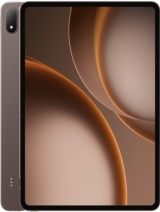
This review is based on Oppo’s published specifications and public benchmark data for the Oppo Pad 4 Pro, and the rating is spec-based. GoSolo does not physically test devices; where we estimate real-world behaviour such as battery life or charge time, we say so. How we rate phones.
Overview
The Oppo Pad 4 Pro is a 13.2-inch tablet built for desk work and note-taking, with a smooth 144Hz LCD screen and flagship Snapdragon 8 Elite performance—but it's a WiFi-only device hampered by uninspired cameras and 67W charging that lags behind rivals offering 100W or more at this price.
Design & build
At 672 grams and 5.9 mm thick, the Pad 4 Pro is light and slim for a 13.2-inch tablet, making it reasonably portable despite the large footprint. The aluminum frame and back feel solid, and the 87.6% screen-to-body ratio is respectable for the class. Stylus and keyboard accessory support are welcome additions for productivity work. However, the lack of color options beyond gold, brown, and purple suggests Oppo is playing it safe rather than pushing any distinctive identity. The tablet is WiFi-only, which is a conscious trade-off for weight and cost, but it also means you're tethered to a wireless network—a limitation that stings at this price when alternatives offer cellular options.
Display
The 13.2-inch LCD screen runs at 144Hz and pushes a tall 2120 x 3000 pixel resolution that yields 315 ppi density. For tablet work, this is genuinely useful: the vertical pixel count makes reading documents and scrolling through text feel natural, and the 144Hz refresh keeps panning and note-taking fluid. Peak brightness hits 1000 nits, which is enough for outdoor readability without squinting, though the 700-nit typical brightness is more modest. LCD technology means you won't get OLED's contrast punch or infinite blacks, but for a device this size meant for desk work, the trade-off for durability and brightness is sensible. Viewing angles are standard IPS—fine for solo work, less impressive if sharing the screen with others.
Performance
The Snapdragon 8 Elite Gen 5 is current-generation flagship silicon, and it handles everything this tablet will throw at it without flinching. With up to 16GB RAM and the choice of 256GB or 512GB storage on UFS 4.1, multitasking and app switching are frictionless. Opening heavy productivity apps, video editing, or running demanding games presents no lag. For the kind of desk-bound work a tablet this size is built for—document editing, spreadsheets, creative apps—this is overkill in the best sense. You're not constrained by the hardware; the question is whether you need that much power at this price, and for a device you'll own for several years, having headroom is reasonable insurance.
Software
ColorOS 16 running on Android 16 is current and should receive several years of updates from Oppo. The interface is responsive and generally clean, though ColorOS tends to include bloatware out of the box that takes some pruning. For a tablet optimized around productivity and stylus input, the software deserves more tailoring to that use case—multitasking gestures, split-screen workflows, and note-taking app integration could be deeper. That said, stock Android alternatives on other tablets aren't dramatically more polished, so ColorOS isn't a major drawback, just not a standout.
Camera
A 13MP rear camera and 8MP front camera are genuinely underwhelming for a tablet in 2026, even one positioned for work. The rear sensor can shoot 4K at 30fps with gyro-EIS, which sounds capable on paper, but 13MP resolution is cramped for a large screen and won't satisfy anyone doing creative work or photo curation. The 8MP front camera is adequate for video calls if you're in good lighting, but it won't flatter you, and it's far behind what rivals are offering. If you plan to use this tablet for content creation, photography, or regular video conferencing, look elsewhere. The cameras feel like an afterthought, included because the spec sheet demands them rather than because Oppo invested in making them good.
Battery & charging
The 13,380 mAh cell paired with a large, relatively efficient LCD screen delivers approximately 10 to 12 hours of moderate screen-on time, which covers a full work day and then some. For a tablet used primarily at a desk, endurance is strong. Charging at 67W takes roughly 45 to 60 minutes from empty to full, which is reasonable for top-ups during a work break but noticeably slower than the 100W+ charging many rivals now offer in the same price band. In a competitive market, 67W starts to feel like a deliberate cost-cutting measure rather than a genuine limitation. Fast charging used to be a differentiator; now it's becoming table stakes, and the Pad 4 Pro is falling slightly behind.
Value & verdict
At around 540 EUR, the Oppo Pad 4 Pro occupies an awkward middle ground. It's expensive enough that you expect flagship features across the board, yet it stumbles on charging speed, cameras, and connectivity options that mid-range competitors now routinely include. The 13.2-inch 144Hz display and Snapdragon 8 Elite performance are genuinely strong, and stylus support makes it credible for note-taking and productivity. But the lack of 5G, weak cameras, and 67W charging suggest Oppo has prioritized thinness and weight over all-around capability. If you're buying a large tablet for stationary desk work and note-taking at home or in an office, and you don't need cellular or strong video-calling performance, this tablet delivers solid value. If you expect a flagship tablet to excel across every dimension, you'll find gaps that feel unfinished.
Verdict
This tablet suits anyone doing long-form reading, document editing, and stylus note-taking in a WiFi-connected environment who values a large, smooth screen over portability or creative ambitions. Skip it if you need cellular connectivity, plan to use the camera for any real work, or expect premium charging speeds at this price.
- 13.2-inch 144Hz LCD display with tall 3000-pixel resolution reads crisp and scrolls fluidly for productivity and reading
- Snapdragon 8 Elite Gen 5 and up to 16GB RAM handle multitasking and demanding apps without lag, with stylus and keyboard accessory support built in
- 13,380 mAh battery delivers roughly 10–12 hours of moderate screen-on time on a large display
- Wi-Fi 6/7 and aptX HD Bluetooth for reliable wireless connectivity in stationary work environments
- 67W charging is middle-of-the-road for a tablet this size in 2026; rivals at this price now hit 100W or higher
- No cellular option limits portability to WiFi zones; a tablet without 5G feels incomplete at this price point
- 13MP rear camera and 8MP front camera are bare-minimum specs that will disappoint anyone doing video calls or creative work on a large screen
Oppo Pad 4 Pro Key Specifications
The essentials at a glance. See the full spec sheet.
| Released | 2026, April 21 |
|---|---|
| Display | 13.2 inches, 530.0 cm2 (~87.6% screen-to-body ratio), LCD, 144Hz, 700 nits (typ), 1000 nits (peak) |
| Resolution | 2120 x 3000 pixels (~315 ppi density) |
| Chipset | Qualcomm SM8850-AC Snapdragon 8 Elite Gen 5 (3 nm) |
| RAM & storage | 256GB 8GB RAM, 256GB 12GB RAM, 512GB 12GB RAM, 512GB 16GB RAM |
| Main camera | 13 MP |
| Selfie camera | 8 MP |
| Battery | 13380 mAh |
| Charging | 67W wired |
| Software | Android 16, ColorOS 16 |
| Dimensions | 289.7 x 208.8 x 5.9 mm (11.41 x 8.22 x 0.23 in) |
| Weight | 672 g (1.48 lb) |
| Build | Aluminum frame, aluminum back |
| Durability | Stylus support Keyboard support |
| Network | No cellular connectivity |
| NFC | No |
| USB | USB Type-C 3.2, OTG |
Oppo Pad 4 Pro FAQ
Common questions, answered from the spec sheet.
Does the Pad 4 Pro support 5G?
No. The Pad 4 Pro tops out at No cellular connectivity, without 5G.
What chipset does the Pad 4 Pro use?
The Pad 4 Pro runs on the Qualcomm SM8850-AC Snapdragon 8 Elite Gen 5 (3 nm).
What display does the Pad 4 Pro have?
A 13.2 inches, 530.0 cm2 (~87.6% screen-to-body ratio) LCD, 144Hz, 700 nits (typ), 1000 nits (peak), 2120 x 3000 pixels (~315 ppi density).
How big is the Pad 4 Pro battery?
The Pad 4 Pro has a 13380 mAh battery. Charging is rated at 67W wired.
Does the Pad 4 Pro have NFC?
No, the Pad 4 Pro does not list NFC support.
Is the Pad 4 Pro water resistant?
The Pad 4 Pro carries a Stylus support Keyboard support rating.
Does the Pad 4 Pro support a microSD card?
No, the Pad 4 Pro does not support expandable storage.
Does the Pad 4 Pro have a headphone jack?
No, the Pad 4 Pro does not have a 3.5mm headphone jack.
Alternatives to consider
If the Pad 4 Pro isn’t quite right, these are the closest calls.
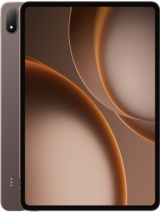
Pad 5 Pro
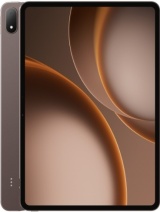
Pad 3 Pro
Pad Mini
Pad 6
Galaxy Tab S11 Ultra