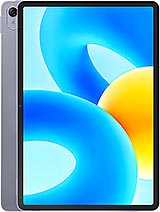
Oppo Pad Air2 review
The Pad Air2 is a solid pick for students who mostly study and consume media at a desk or at home, or for anyone who wants a large, light tablet for reading and streaming without leaving Wi-Fi range. If you need to work offline, travel with cellular data, or game beyond light apps, look elsewhere.
This review is based on Oppo’s published specifications and public benchmark data for the Oppo Pad Air2, and the rating is spec-based. GoSolo does not physically test devices; where we estimate real-world behaviour such as battery life or charge time, we say so. How we rate phones.
Overview
The Oppo Pad Air2 is a large, light tablet aimed squarely at students and home users who primarily need a good screen for reading and note-taking. It delivers solid screen real estate and all-day battery at a budget price, but the stripped-down Helio G99 chipset and Wi-Fi-only connectivity make it a one-trick device for media and productivity, not gaming or on-the-go work.
Design & build
At 538 grams and just 6.9mm thick, the Pad Air2 feels light and portable for its 11.4-inch size, making it genuinely pocketable for a tablet this large. The IPS LCD panel dominates the front with an 82.7% screen-to-body ratio, so there is minimal bezel waste. Build materials are not specified, but the slim profile and light weight suggest plastic or aluminum rather than glass or ceramic on the back. Stylus support is included, a useful draw for note-taking, though no stylus ships in the box and the entry-level chipset will not handle creative apps with the finesse a designer would expect. For a device at this price, the chassis feels no different from rivals, which is to say adequate but not notable.
Display
The 11.4-inch, 1720 x 2408 panel strikes a sensible balance for a mid-range tablet: large enough for comfortable reading and video, with a 260 ppi density that keeps text sharp. The 90Hz refresh rate is a standard feature now at this price, and it does help navigation and scrolling feel smooth rather than choppy. The 400 nits typical brightness is the real trade-off. It is adequate indoors and for evening use, but direct sunlight will wash out the display, forcing you to tilt or shield the screen. Rivals in the same ballpark often hit 500 nits or higher, and that extra headroom makes a noticeable difference if you plan to read outdoors or use the tablet in bright kitchens. For a home-bound student or office worker, though, 400 nits is livable.
Performance
The Helio G99 is a capable mid-range processor for 2023, handling everyday apps, video streaming, and web browsing without lag. Light games run fine, and the 6 or 8GB RAM options (depending on storage tier) are sufficient for multitasking and app switching. Where the limits show is in sustained 3D graphics: demanding games will throttle, and you will not get the frame rates a gamer expects. For productivity, note-taking apps, and media consumption, it is more than adequate. The gulf between this and a flagship is not performance; it is that a flagship would do all of this while also crushing games, which this device simply does not pretend to do. If you are buying this to edit video or run intensive photo apps, reconsider. If you are a student taking notes and watching videos, it covers your needs.
Software
Android 13 with ColorOS 13.2 is fairly current for a November 2023 release, though by mid-2026 it will be aging. ColorOS adds Oppo's own launcher and software tweaks on top of stock Android, which can feel bloated or convenient depending on your preference. The lack of a microSD slot means you are locked into your storage choice at purchase. 128GB with 6GB RAM is cramped if you cache a lot of media or install many apps; the 256GB option, though pricier, gives real breathing room. Update policy from Oppo is not legendary, so plan for security updates more than feature upgrades.
Camera
Both the rear and front cameras are 8MP sensors capturing 1080p video. This is functional for the occasional video call or document scan, but neither camera will impress. Colors are dull, detail is soft, and there is no optical zoom or multiple lenses. For a tablet, that is fairly standard—most tablets are not bought for photography—but if you need a camera for work or content, buy a dedicated camera or phone instead. This is a camera only by technicality.
Battery & charging
The 8000 mAh battery paired with the modest Helio G99 and 400-nit display should net you roughly 10 to 12 hours of screen-on time with moderate use, covering a full day of work or entertainment. The 33W wired charger tops it up in about 60 to 90 minutes from empty, which is straightforward but slow compared to tablets that offer 60W or higher. For a device you are likely to use daily at a desk or at home, the charge speed is not critical, but it does mean you need to plan ahead if you are traveling or need to squeeze in a quick top-up before leaving the house. No wireless charging, which is standard to omit at this tier.
Connectivity & value
The Pad Air2 is Wi-Fi only. There is no cellular modem, no mobile data, so you are tethered to a home network or public Wi-Fi. For a student at school, in the library, or at home studying, that is usually fine. For anyone who needs to work on the move or access email from the road, this is a deal-breaker. Bluetooth 5.2 is robust and pairs reliably with wireless headphones and keyboards. At around 170 EUR, it undercuts many larger rivals and offers good value for a device with an 11.4-inch screen and all-day battery. The question is not price per inch but whether Wi-Fi-only use and the entry-level chipset fit your life. If they do, the Pad Air2 is straightforward value. If you need cellular or gaming performance, you are paying for a device that cannot deliver it.
Verdict
The Pad Air2 is a solid pick for students who mostly study and consume media at a desk or at home, or for anyone who wants a large, light tablet for reading and streaming without leaving Wi-Fi range. If you need to work offline, travel with cellular data, or game beyond light apps, look elsewhere.
- Light and slim for its 11.4-inch size, easy to carry compared to rival tablets
- All-day battery on moderate use without draining during a typical workday
- 11.4-inch display with 90Hz refresh provides ample room for reading, notes, and video
- Stylus support bakes in utility for note-taking apps, a genuine plus for students
- Wi-Fi-only connectivity locks you into networks, eliminating any mobility for work or email on the move
- 400-nit brightness is too dim for outdoor use or bright indoor settings without angling the tablet
- 33W charging takes 60–90 minutes to refill, slow by current standards and awkward for travel
Oppo Pad Air2 Key Specifications
The essentials at a glance. See the full spec sheet.
| Released | 2023, November 23 |
|---|---|
| Display | 11.4 inches, 396.6 cm2 (~82.7% screen-to-body ratio), IPS LCD, 90Hz, 400 nits (typ) |
| Resolution | 1720 x 2408 pixels (~260 ppi density) |
| Chipset | Mediatek Helio G99 (6 nm) |
| RAM & storage | 128GB 6GB RAM, 128GB 8GB RAM, 256GB 8GB RAM |
| Main camera | 8 MP |
| Selfie camera | 8 MP |
| Battery | 8000 mAh |
| Charging | 33W wired, PD |
| Software | Android 13, ColorOS 13.2 |
| Dimensions | 255.1 x 188 x 6.9 mm (10.04 x 7.40 x 0.27 in) |
| Weight | 538 g (1.19 lb) |
| Durability | Stylus support |
| Network | No cellular connectivity |
| NFC | No |
| USB | USB Type-C 2.0 |
Oppo Pad Air2 FAQ
Common questions, answered from the spec sheet.
Does the Pad Air2 support 5G?
No. The Pad Air2 tops out at No cellular connectivity, without 5G.
What chipset does the Pad Air2 use?
The Pad Air2 runs on the Mediatek Helio G99 (6 nm).
What display does the Pad Air2 have?
A 11.4 inches, 396.6 cm2 (~82.7% screen-to-body ratio) IPS LCD, 90Hz, 400 nits (typ), 1720 x 2408 pixels (~260 ppi density).
How big is the Pad Air2 battery?
The Pad Air2 has a 8000 mAh battery. Charging is rated at 33W wired, PD.
Does the Pad Air2 have NFC?
No, the Pad Air2 does not list NFC support.
Is the Pad Air2 water resistant?
The Pad Air2 carries a Stylus support rating.
Does the Pad Air2 support a microSD card?
No, the Pad Air2 does not support expandable storage.
Does the Pad Air2 have a headphone jack?
No, the Pad Air2 does not have a 3.5mm headphone jack.
Alternatives to consider
If the Pad Air2 isn’t quite right, these are the closest calls.
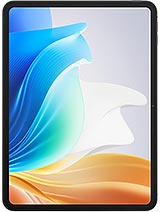
Pad Neo

Pad Neo WiFi
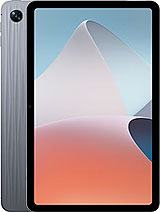
Pad Air
Pad 2
Galaxy Tab S9 FE 5G