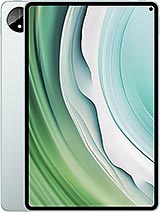
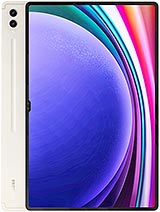
Samsung Galaxy Tab S9 Ultra review
This tablet is for people who genuinely work on large screens and do not mind lugging 732g in a bag. Anyone else will find a 10- or 11-inch model more practical and less costly.
This review is based on Samsung’s published specifications and public benchmark data for the Samsung Galaxy Tab S9 Ultra, and the rating is spec-based. GoSolo does not physically test devices; where we estimate real-world behaviour such as battery life or charge time, we say so. How we rate phones.
Overview
The Galaxy Tab S9 Ultra is a massive, capable tablet with a stunning 14.6-inch AMOLED display and Snapdragon 8 Gen 2 power, but it is genuinely heavy, charges slowly for its size, and its camera system feels like an afterthought. For someone who reads, edits, or multitasks on a large screen all day, it is worth the €1200 outlay; everyone else should consider something smaller.
Design & Build
At 326 × 208 × 5.5 mm and 732g, this is a full-size tablet with real heft. Glass front, aluminium frame and back look clean in Beige and Graphite, and the IP68 rating is genuinely useful—it survives immersion in 1.5m fresh water for 30 minutes, so accidental spills and bathroom use are not stressful. The trade-off is that the thin frame flexes slightly if you squeeze it, and the glass back makes it slippery without a case. The included stylus has 2.8ms latency, which is responsive enough for sketching and handwriting, though it does not rival the sub-1ms pens on top-tier iPad Pros. For a tablet intended to be a portable work surface, the weight means you will use a carrying case and sling it over your shoulder rather than hand-carry it.
Display
The 14.6-inch Dynamic AMOLED 2X is the device's strongest asset. At 1848 × 2960 pixels (239 ppi), text is pin-sharp, and the 16:10 aspect ratio gives you sensible width for web browsing and document editing. 120Hz refresh makes scrolling through long articles and social feeds feel buttery smooth, and HDR10+ support means colour-graded films and photos render with deeper contrast if the source material is encoded for it. Side-by-side with an older iPad, the clarity and smoothness are obvious enough that you notice every time you switch back. For reading, document work, and media consumption, this screen justifies the price on its own.
Performance
The Snapdragon 8 Gen 2 (4nm) and Adreno 740 GPU are overkill for basic tablet tasks—email, web browsing, streaming—but the overhead pays off if you edit photos, cut video, or run heavy creative apps. With 12GB of RAM (16GB on the top model), multitasking across 20+ browser tabs, Notes, Slack, and a media app runs smooth without the app-switcher lag you see on mid-range tablets. In demanding games, expect high settings and 60 fps for 30–45 minutes before thermal throttling dials back the frame rate; for casual gaming and scrolling, throttling is irrelevant. This is more compute than most people throw at a tablet, but if your tablet is your laptop, it earns its place.
Software
Android 13 with One UI 6 ships out of the box, and Samsung promises 4 major Android upgrades, which puts you roughly at Android 17 (or thereabouts) by the end of support—reasonable longevity. One UI on tablets is verbose and cluttered compared to stock Android, but split-screen multitasking and Samsung DeX (a desktop-like interface over Wi-Fi) are genuinely useful for productivity work. The app ecosystem on Android tablets is thinner than on iPads, so if you rely on apps like Procreate or LumaFusion, you will need an iPhone or Mac instead. For reading, note-taking, and office work, the software is adequate.
Camera
The rear cameras are a weak point: 13MP wide with f/2.0 and a 1/3.4" sensor, plus an 8MP ultrawide. Both shoot 4K at 30fps, and there is LED flash for low light, but the sensors are small and the processing feels flat compared to flagship phones. The front has two 12MP cameras (wide and 120° ultrawide), which is overkill for video calls but at least gives you options. Realistically, you will use the rear camera to photograph whiteboards or documents in a pinch, not to take holiday photos. The 2.8ms stylus latency matters far more for creative work than any camera here.
Battery & Charging
The 11200 mAh battery yields about 10–12 hours of moderate use (scrolling, streaming, light work), which is a full workday if you are not gaming constantly. Heavy creative work or video playback will trim that to 8–9 hours, so charging strategy matters. The 45W wired charger is where Samsung skimped: rivals and iPads now hit 65W or higher, meaning your S9 Ultra takes roughly 1.5–2 hours to full from empty, or about 60 minutes to reach 50%. There is no wireless charging, which is unusual for a tablet at this price. If you commute or travel, you will want to carry a charger and plan around the slower refill time.
Value & Verdict
At about €1200, the S9 Ultra sits at the premium end of the Android tablet market, competing with the latest iPad Air and iPad Pro 12.9". You are paying flagship phone money for a tool that is bigger and heavier but slower to charge and weaker on camera. That equation only makes sense if you plan to edit documents, code, or media on it regularly—the display and processing power justify the outlay for creative work. For someone who wants a tablet for reading, casual browsing, and Netflix in bed, a smaller and cheaper model (the Tab S9 or 11-inch iPad Air) will serve better and fit a backpack without strain. The camera system is clearly not a priority here, so do not expect to replace your phone. If you are buying this, you have already decided you want a large screen and can afford the weight and cost; Samsung has built the right machine for that person.
Verdict
This tablet is for people who genuinely work on large screens and do not mind lugging 732g in a bag. Anyone else will find a 10- or 11-inch model more practical and less costly.
- 14.6-inch Dynamic AMOLED 2X display with 120Hz refresh and 239 ppi—exceptionally clear and smooth for document work, video, and reading, with HDR10+ support making colour-graded content pop
- Snapdragon 8 Gen 2 with 12GB RAM handles sustained multitasking and resource-heavy creative apps (photo editing, video work) without stuttering, and the Adreno 740 GPU keeps games smooth for 30+ minutes before thermal throttling kicks in
- 11200 mAh battery delivers 10–12 hours of mixed use (reading, browsing, streaming), enough for a full workday without seeking an outlet
- IP68 rating and 5.5mm aluminium-glass build survive spills and dust without fuss, and the included stylus (2.8ms latency) is accurate enough for sketching and note-taking
- Weighs 732g (1.61 lb) and must go in a bag; holding it one-handed for longer than a few minutes becomes tiring, and the thin frame demands a case to avoid dropping it
- 45W charging is dated for a tablet this size—rivals and even last year's iPads hit 65W or higher, so getting to 50% takes over an hour
- Camera system is functional but mediocre: 13MP wide and 8MP ultrawide on the back feel like they were included to tick a box rather than enable real work
Samsung Galaxy Tab S9 Ultra Key Specifications
The essentials at a glance. See the full spec sheet.
| Released | 2023, July 26 |
|---|---|
| Display | 14.6 inches, 617.8 cm2 (~90.7% screen-to-body ratio), Dynamic AMOLED 2X, 120Hz, HDR10+ |
| Resolution | 1848 x 2960 pixels, 16:10 ratio (~239 ppi density) |
| Chipset | Qualcomm SM8550-AC Snapdragon 8 Gen 2 (4 nm) |
| RAM & storage | 256GB 12GB RAM, 512GB 12GB RAM, 1TB 12GB RAM, 1TB 16GB RAM |
| Main camera | 13 MP, f/2.0, 26mm (wide), 1/3.4", 1.0µm, AF 8 MP, f/2.2, (ultrawide) |
| Selfie camera | 12 MP, f/2.2, 26mm (wide) 12 MP, f/2.4, 120˚ (ultrawide) |
| Battery | 11200 mAh |
| Charging | 45W wired |
| Software | Android 13, up to 4 major Android upgrades, One UI 6 |
| Dimensions | 326.4 x 208.6 x 5.5 mm (12.85 x 8.21 x 0.22 in) |
| Weight | 732 g (1.61 lb) |
| Build | Glass front, aluminum frame, aluminum back |
| Durability | IP68 dust tight and water resistant (immersible up to 1.5m for 30 min) Stylus, 2.8ms latency (Bluetooth integration, accelerometer, gyro) |
| Network | GSM / HSPA / LTE / 5G |
| NFC | No |
| USB | USB Type-C 3.2, magnetic connector |
Samsung Galaxy Tab S9 Ultra FAQ
Common questions, answered from the spec sheet.
Does the Galaxy Tab S9 Ultra support 5G?
Yes. The Galaxy Tab S9 Ultra supports 5G networks.
What chipset does the Galaxy Tab S9 Ultra use?
The Galaxy Tab S9 Ultra runs on the Qualcomm SM8550-AC Snapdragon 8 Gen 2 (4 nm).
What display does the Galaxy Tab S9 Ultra have?
A 14.6 inches, 617.8 cm2 (~90.7% screen-to-body ratio) Dynamic AMOLED 2X, 120Hz, HDR10+, 1848 x 2960 pixels, 16:10 ratio (~239 ppi density).
How big is the Galaxy Tab S9 Ultra battery?
The Galaxy Tab S9 Ultra has a 11200 mAh battery. Charging is rated at 45W wired.
Does the Galaxy Tab S9 Ultra have NFC?
No, the Galaxy Tab S9 Ultra does not list NFC support.
Is the Galaxy Tab S9 Ultra water resistant?
The Galaxy Tab S9 Ultra carries a IP68 dust tight and water resistant (immersible up to 1.5m for 30 min) Stylus, 2.8ms latency (Bluetooth integration, accelerometer, gyro) rating.
Does the Galaxy Tab S9 Ultra support a microSD card?
Yes, the Galaxy Tab S9 Ultra supports expandable storage (microSDXC (dedicated slot)).
Does the Galaxy Tab S9 Ultra have a headphone jack?
No, the Galaxy Tab S9 Ultra does not have a 3.5mm headphone jack.
Alternatives to consider
If the Galaxy Tab S9 Ultra isn’t quite right, these are the closest calls.
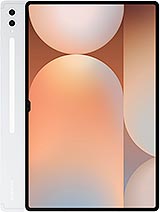
Galaxy Tab S10 Ultra

Galaxy Tab S9 Ultra WiFi
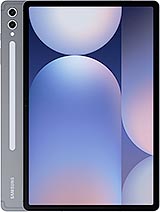
Galaxy Tab S10+

Galaxy Tab S9 WiFi
Pad 6 Pro