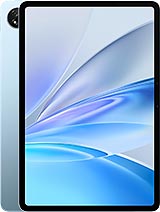
Ulefone Tab W10 review
The Tab W10 suits anyone who needs a large screen for reading, watching videos, and light browsing on a tight budget—students, casual users, and households in price-sensitive markets will get solid value. Avoid it if you read small text for hours, multitask heavily, or want responsive performance; a mid-range tablet from a mainstream brand would serve you better in those cases.
This review is based on Ulefone’s published specifications and public benchmark data for the Ulefone Tab W10, and the rating is spec-based. GoSolo does not physically test devices; where we estimate real-world behaviour such as battery life or charge time, we say so. How we rate phones.
Overview
The Ulefone Tab W10 is a 10.1-inch budget tablet built for reading, video watching, and light browsing—not gaming. At €80, it delivers basic functionality and reasonable battery life, but the 149 ppi display and entry-level Unisoc chip mean it's a no-frills option for learners and casual users in price-sensitive markets.
Design & build
At 430 grams and 7.9 mm thick, the Tab W10 is light enough to hold one-handed for extended reading or video, and thin enough to slip into most bags without bulk. The industrial design is minimal—Space Gray plastic, nothing fancy—but it feels sturdy in hand and doesn't creak. The frame sits well for watching videos in portrait or landscape, and the dual-SIM trays add flexibility for regional variants. For the price, the build is honest: no premium materials, but no cheap shortcuts either. It's exactly what you'd expect from a device at this price point.
Display
The 10.1-inch IPS LCD is genuinely large and bright enough for daytime viewing, with wide enough angles to share with someone beside you. However, the 800×1280 resolution at 149 ppi is the catch. That density was acceptable for 7-inch tablets five years ago, but now it's noticeably soft. Text in books or documents isn't blurry, but it lacks the sharpness of even a budget smartphone. If you're reading for hours daily, or viewing spreadsheets and technical diagrams, you'll notice the graininess. The 60 Hz refresh rate is fine for static content and video, though scrolling through lists or web pages reveals slight stuttering. For casual users and students using it mostly for PDFs and watching lessons, the screen does its job. Heavy readers and detail-oriented workers should budget for a sharper mid-range alternative.
Performance
The Unisoc T606 is an entry-level chip, and it behaves like one. Light tasks—email, messaging, reading, basic web browsing, and video playback up to 1080p—run without drama. Open multiple tabs or apps simultaneously, though, and you'll feel stuttering and wait times. Gaming is off the table; even casual games stutter, and anything demanding will be unplayable. Photo editing and document work with large files (heavy Word docs, high-resolution images) cause noticeable slowdowns. For a student or office worker using this as a note-taking and reference device, the performance is acceptable. If you plan to juggle apps or do any real creative work, this chip will frustrate you quickly.
Software
Android 14 runs cleanly on this hardware with minimal bloat. Ulefone's overlay is thin, and the core OS experience is close to stock Android. Updates are a question mark—Ulefone's track record on long-term support is spotty, so don't expect years of patches. That said, for a €80 tablet used mostly offline or in controlled environments (classroom, home), security shouldn't be your primary concern. The inclusion of an FM radio with recording is a nice touch for markets where broadcast radio still matters. Overall, software is straightforward without being a differentiator.
Camera
The 16 MP rear camera with f/2.2 aperture and 1.0 µm pixels captures acceptable daylight photos in bright conditions, though low-light performance is predictably weak. Video maxes out at 1080p and 30 fps, which is fine for recording a lecture or a quick memo, but nothing more. The 8 MP selfie camera is adequate for video calls. In truth, the cameras are afterthoughts on a tablet this cheap. You're not buying this for photography; you're buying it to read and watch. That's clear in the spec sheet, and it's honest about the device's priorities.
Battery & charging
The 8800 mAh battery delivers genuine endurance. With light browsing, reading, and casual video watching, expect a full day or more between charges. Heavy video streaming (YouTube, Netflix at high brightness) will burn through it in 6–8 hours, which is typical for the capacity. The real weak point is 18W charging. With such a small battery, you'd think a full charge would be quick, but 18W is sluggish even by budget standards. Expect 2.5 to 3 hours for a complete charge from empty, or an hour to 50%. Rivals in this price range have moved to 30–45W, so this feels like a missed opportunity. For an always-at-home tablet, it's acceptable. For travel or daily portability, bring a charger and patience.
Value & verdict-context
At €80, the Ulefone Tab W10 competes with other entry-level tablets from brands like Lenovo and Samsung. It undercuts many on price, which buys you a functional large-screen device for media and reading. Where it lags: the display is softer than rivals' screens, the chip is older, and charging is slow. Where it matches: battery life, build quality, and expandable storage. This tablet is for students on a tight budget, casual readers, and families buying a second device for the kids—not for power users or professionals. The question isn't whether it's good; it's whether €80 for a functional 10-inch screen is worth the softness and performance limits. For that market, it's a reasonable trade-off.
Verdict
The Tab W10 suits anyone who needs a large screen for reading, watching videos, and light browsing on a tight budget—students, casual users, and households in price-sensitive markets will get solid value. Avoid it if you read small text for hours, multitask heavily, or want responsive performance; a mid-range tablet from a mainstream brand would serve you better in those cases.
- 10.1-inch screen with 77.9% screen-to-body ratio is genuinely useful for reading PDFs, documents, and watching video without constant fiddling
- 8800 mAh battery easily outlasts a full day of light use—browsing, reading, video playback—with realistic room left over
- Expandable storage via microSD means you can load it with textbooks, videos, or media without worrying about the base 128GB filling up
- Dual SIM and LTE bands cover most global carriers, making it practical for travelers or dual-line users
- 149 ppi at 10.1 inches means text and UI elements are noticeably coarse up close compared to modern tablets—reading small text for hours gets tiring
- Unisoc T606 stumbles with any real multitasking, heavy browsing, or app-switching; expect lag and app reloads if you push it
- 18W charging is glacially slow by 2024 standards—expect 2+ hours to full battery even with a small 8800 mAh capacity
Ulefone Tab W10 Key Specifications
The essentials at a glance. See the full spec sheet.
| Released | 2024, June |
|---|---|
| Display | 10.1 inches, 295.8 cm2 (~77.9% screen-to-body ratio), IPS LCD |
| Resolution | 800 x 1280 pixels, 16:10 ratio (~149 ppi density) |
| Chipset | Unisoc T606 (12 nm) |
| RAM & storage | 128GB 4GB RAM |
| Main camera | 16 MP, f/2.2, (wide), 1.0µm |
| Selfie camera | 8 MP, f/2.0, (wide), 1.12µm |
| Battery | 8800 mAh |
| Software | Android 14 |
| Dimensions | 239.6 x 158.4 x 7.9 mm (9.43 x 6.24 x 0.31 in) |
| Weight | 430 g (15.17 oz) |
| Network | GSM / HSPA / LTE |
| NFC | No |
| USB | USB Type-C 2.0, OTG |
Ulefone Tab W10 FAQ
Common questions, answered from the spec sheet.
Does the Tab W10 support 5G?
No. The Tab W10 tops out at GSM / HSPA / LTE, without 5G.
What chipset does the Tab W10 use?
The Tab W10 runs on the Unisoc T606 (12 nm).
What display does the Tab W10 have?
A 10.1 inches, 295.8 cm2 (~77.9% screen-to-body ratio) IPS LCD, 800 x 1280 pixels, 16:10 ratio (~149 ppi density).
How big is the Tab W10 battery?
The Tab W10 has a 8800 mAh battery.
Does the Tab W10 have NFC?
No, the Tab W10 does not list NFC support.
Does the Tab W10 support a microSD card?
Yes, the Tab W10 supports expandable storage (microSDXC (uses shared SIM slot)).
Alternatives to consider
If the Tab W10 isn’t quite right, these are the closest calls.
Tab A10
Tab A11
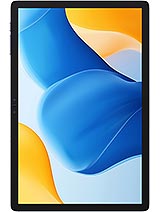
Tab A10 Pro
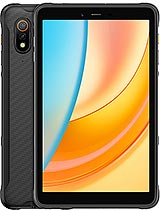
Armor Pad 3 Pro
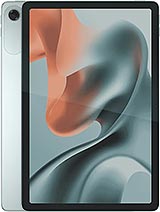
Moto Pad 60 Lite