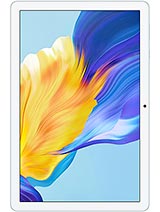
Umidigi G1 Tab review
The G1 Tab suits someone who wants a very cheap home tablet for reading and casual video and can tolerate slow charging and grainy text. Everyone else should spend a bit more for a tablet with a sharper display, faster processor, and quicker charging—the jump in usability is worth it even at a modest price increase.
This review is based on Umidigi’s published specifications and public benchmark data for the Umidigi G1 Tab, and the rating is spec-based. GoSolo does not physically test devices; where we estimate real-world behaviour such as battery life or charge time, we say so. How we rate phones.
Overview
The Umidigi G1 Tab is a Wi-Fi-only tablet aimed at casual media consumption and light work, built around a weak processor and saddled with painfully slow 10W charging. It is strictly a home-use device for reading, videos, and browsing if you are not bothered by soft text and modest performance, and it only makes sense at a bottom-shelf price.
Design & Build
At 576g and 9.3mm thick, the G1 Tab is appropriately compact for its 10.1-inch frame, easy to hold with one hand for reading and video. The weight is not feather-light but falls within the bracket of budget tablets from the same era. There is no premium build material mentioned in the spec sheet, which at this price tier is unremarkable. The USB Type-C port is standard, as is the headphone jack—a small win for anyone who still uses wired audio. For a device positioned as a home-first tablet, the form factor does the job without pretence.
Display
The 800x1280 IPS LCD is the clearest weakness here. At 149 ppi across 10.1 inches, the pixel density is noticeably coarse; text edges are soft and photographs lack crispness. For comparison, most modern phones sit at 400+ ppi, and rival budget tablets often hit 200+ ppi. If you spend hours reading news or ebooks, you will notice the graininess within minutes. The 16:10 aspect ratio and 74.5% screen-to-body ratio are both fine for the class. The brightness and color accuracy of the IPS panel are likely adequate for indoor viewing, but no one is buying this for image quality.
Performance
The RK3562 is a 22nm quad-core processor clocked at 2.0GHz with 4GB of RAM—a combination that handles basic tasks without crashing but quickly shows its limits. Light web browsing, YouTube playback, and email are fine. Heavier multitasking, any game with real graphics, or large document editing will cause lag and stuttering. This chip was modest even in 2023, and by 2024-2025 it feels outdated for the price. The microSD slot helps stretch storage, but it cannot speed up the processor. If you need more than casual use, you should look at tablets with a more recent or capable chipset in the same budget tier.
Battery & Charging
The 6000mAh battery yields about 8 to 10 hours of screen-on time during moderate use—browsing, reading, video playback—which is enough for a full day if you are not pushing the device hard. The real pain is the 10W charging speed. Refilling the battery takes roughly 2 to 3 hours, which means if the tablet drains during your work day, you face a long wait to use it again. No fast-charging option, no charger tuning, just slow and steady trickle. Rivals in the budget space now offer 20W or higher, so this feels like a deliberate cost-cut rather than an oversight. For a device you plan to leave on a shelf at home, it is tolerable; for anything more active, it is frustrating.
Camera
Both the main and selfie cameras are 8MP with f/2.2 aperture and 720p video. This pairing is functional for casual video calls on Wi-Fi and scanning documents, but the resolution is too low for keepsake photos or crisp recordings. Zoom in on a 8MP photo on a larger screen and you see grain and loss of detail. The LED flash on the rear camera helps in dim light, but cannot fix the fundamental low resolution. If you plan to use this tablet for more than the occasional Zoom call or snapshot, bring a phone. For the intended use case—a home device for media—the cameras are an afterthought, as they should be.
Software & Connectivity
Android 13 at the time of release was current, though by 2026 it is two major versions behind. No mention of an update roadmap is a red flag; expect this tablet to stall on Android 13 or drop one more patch and stop. Wi-Fi 6 (802.11ax) is a genuine strength for a budget tablet, offering faster and more stable wireless than older standards—especially valuable at home where it can saturate the connection. Bluetooth 5.0 handles audio pairing without fuss. The tablet has no cellular connectivity, no GPS, no NFC, and no FM radio, so it is a home-on-Wi-Fi device only. Tethering to a smartphone for mobile data is the workaround, which is fine for a secondary device but means it cannot go anywhere alone.
Value & Verdict Context
The Umidigi G1 Tab is a clearance-tier tablet: cheap, Wi-Fi-only, underpowered, and slow to charge. It makes sense only if you need an emergency ebook reader or second screen for home media and you cannot spend more than $80–100. For anything beyond that—schoolwork, creative apps, gaming—there are better tablets at the same price from more established brands, with faster chips, sharper displays, and quicker charging. The soft screen and sluggish processor are not just minor trade-offs; they define the user experience. The dedicated microSD slot and Wi-Fi 6 are small pluses, but they do not outweigh the core limitations.
Verdict
The G1 Tab suits someone who wants a very cheap home tablet for reading and casual video and can tolerate slow charging and grainy text. Everyone else should spend a bit more for a tablet with a sharper display, faster processor, and quicker charging—the jump in usability is worth it even at a modest price increase.
- Wi-Fi 6 and Bluetooth 5.0 keep data and audio responsive on a home network
- 6000mAh battery delivers a full day of moderate browsing or video without needing to plug in
- 10.1-inch screen is comfortable for reading and media at a size most other budget tablets match
- Dedicated microSD slot means you are not locked into 64GB of storage
- 10W charging is glacially slow; expect 2 to 3 hours to refill the battery, leaving no margin for draining during the day
- 149 ppi display is visibly soft compared to phones and even rival tablets, making text and photos look grainy
- RK3562 quad-core processor with 4GB RAM struggles with any sustained load—light browsing only, avoid gaming or heavy apps
Umidigi G1 Tab Key Specifications
The essentials at a glance. See the full spec sheet.
| Released | 2023 |
|---|---|
| Display | 10.1 inches, 295.8 cm2 (~74.5% screen-to-body ratio), IPS LCD |
| Resolution | 800 x 1280 pixels, 16:10 ratio (~149 ppi density) |
| Chipset | RK3562 (22 nm) |
| RAM & storage | 64GB 4GB RAM |
| Main camera | 8 MP, f/2.2, (wide) |
| Selfie camera | 8 MP, f/2.2, (wide) |
| Battery | 6000 mAh |
| Charging | 10W wired |
| Software | Android 13 |
| Dimensions | 244.8 x 162.2 x 9.3 mm (9.64 x 6.39 x 0.37 in) |
| Weight | 576 g (1.27 lb) |
| Network | No cellular connectivity |
| NFC | No |
| USB | USB Type-C |
Umidigi G1 Tab FAQ
Common questions, answered from the spec sheet.
Does the G1 Tab support 5G?
No. The G1 Tab tops out at No cellular connectivity, without 5G.
What chipset does the G1 Tab use?
The G1 Tab runs on the RK3562 (22 nm).
What display does the G1 Tab have?
A 10.1 inches, 295.8 cm2 (~74.5% screen-to-body ratio) IPS LCD, 800 x 1280 pixels, 16:10 ratio (~149 ppi density).
How big is the G1 Tab battery?
The G1 Tab has a 6000 mAh battery. Charging is rated at 10W wired.
Does the G1 Tab have NFC?
No, the G1 Tab does not list NFC support.
Does the G1 Tab support a microSD card?
Yes, the G1 Tab supports expandable storage (microSDXC (dedicated slot)).
Does the G1 Tab have a headphone jack?
Yes, the G1 Tab has a 3.5mm headphone jack.
Alternatives to consider
If the G1 Tab isn’t quite right, these are the closest calls.
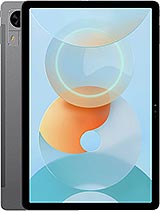
G5 Tab
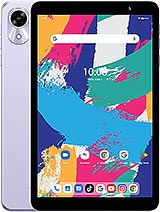
G1 Tab Mini
G3 Tab Ultra
G7 Tab Pro
MatePad SE 11