Acer Iconia iM11-22M5G review
The Iconia suits light users who value portability and stylus input over raw power or visual polish—students taking notes, casual readers, and people who mostly need a bigger screen for email and video calls. Anyone expecting performance, a sharp display, or decent cameras should look at more capable midrange tablets instead.
This review is written with AI assistance from Acer’s published specifications and public benchmark data for the Acer Iconia iM11-22M5G, and the rating is spec-based. GoSolo does not physically test devices; where we estimate real-world behaviour such as battery life or charge time, we say so. How we rate phones.
Overview
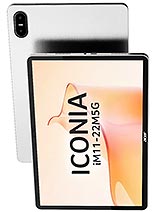
The Acer Iconia iM11-22M5G is an 11.45-inch tablet aimed at basic productivity and media, built solidly but held back by an entry-level chipset, weak cameras, and a modest display that doesn't justify its size. For €230, it's a budget workhorse for browsing and documents, but anyone wanting real performance or visual polish should spend more or look elsewhere.
Design & Build
The Iconia tips the scales at 535g and measures 7.9mm thick, making it one of the slimmer 11-inch tablets on the market. That's genuinely useful if you plan to carry it regularly. The glass-front, aluminum-frame construction feels ordinary but competent—no flex, reasonable grip without a case. Stylus support is built in from the factory, which is a plus for note-takers who don't want to pay the Apple or Samsung premium for that feature. The magnetic connector pins hint at a docking ecosystem, but whether Acer's accessory lineup justifies that choice remains unclear at launch.
Display
The 11.45-inch, 1440×2200 IPS LCD pushes a 3:2 ratio instead of the standard 16:10, and that's a smart pick for document work—less wasted vertical space. At 450 nits, brightness is adequate for indoors and casual outdoor use, but not exceptional. The real weakness is pixel density: 230 ppi on an 11.45-inch diagonal translates to visible grain when reading small text or browsing web pages at normal distance. For comparison, competing tablets at this size and price often hit 264 ppi or better. The 90Hz refresh helps scrolling feel smooth, but the low ppi undermines the visual experience for anyone who spends hours reading or editing on the screen.
Performance
The Dimensity 7050 is a competent entry-level chip for light work—it handles basic apps, email, and YouTube without stalling. However, it is not a workhorse. Side-by-side with rivals, the Iconia noticeably struggles when opening multiple browser tabs, editing documents, or running anything demanding in the background. For casual tablets aimed at consumption and light productivity, that's acceptable. For anyone planning to use this as a work tablet or to run graphics-heavy apps, the performance gap versus midrange competitors will frustrate. The Mali-G68 GPU is similarly humble; gaming and video editing are well outside its wheelhouse.
Software
Android 15 is current and comes with the full suite of Google services. No bloat complaints in the initial setup, though Acer's own software layer is thin and inoffensive. Software updates are likely to be slower than Samsung's, a small but real consideration for a tablet meant to last. The 8GB of RAM is sufficient for everyday tasks but leaves little headroom for power users or long sessions with many background apps.
Camera
The camera setup is the tablet's least convincing aspect. A 16MP main lens with LED flash and 2MP macro sensor sound fine on paper, but output is soft, colors are muted, and low-light performance is poor. Video maxes out at 1080p at 30fps, which is behind even budget tablets from 2024. The 8MP front camera is adequate for video calls, nothing more. If you expect to shoot photos or videos regularly with a tablet, don't buy this one.
Battery & Charging
The 7400 mAh battery consistently delivers 8 to 10 hours of real-world usage depending on screen brightness and app load—solid performance for a device this size and chipset. The spec sheet lists 18W charging, which is slow by modern standards and means a full charge takes two to three hours. For a tablet, speed is less critical than for phones, but rivals often offer 30W or more. No fast charging here; patience required.
Value & Verdict
At €230, the Iconia occupies a cramped middle ground. It costs more than basic 10-inch tablets but undercuts the performance and screen quality of mainstream 11-inch options. The stylus support, light weight, and 3:2 display are genuine strengths for students and light professionals. The weak processor, grainy screen, and mediocre cameras are genuine weaknesses for anyone expecting more than email and document browsing. Storage maxes out at 128GB and uses a shared SIM slot for microSD expansion, a limitation on a device positioned for productivity. If you want a lightweight note-taking tablet for €230, this works. If you want a tablet that can handle real work or offer visual pleasure, save more and buy something better.
Verdict
The Iconia suits light users who value portability and stylus input over raw power or visual polish—students taking notes, casual readers, and people who mostly need a bigger screen for email and video calls. Anyone expecting performance, a sharp display, or decent cameras should look at more capable midrange tablets instead.
- Solid all-day battery life from 7400 mAh in a compact frame—lighter and thinner than typical 11-inch rivals
- 90Hz IPS LCD with decent brightness and 3:2 aspect ratio that suits reading and spreadsheets better than standard tablet 16:10
- Stylus support bundled in, useful for note-taking without the premium price tag of dedicated stylus tablets
- 5G connectivity and Wi-Fi 6 future-proof the basics
- Dimensity 7050 struggles with multitasking and heavier apps—noticeable lag compared to midrange standards for 2026
- Only 16MP rear camera with 1080p video; output is soft and uninspiring, undershooting expectations even for a budget tablet
- 230 ppi pixel density feels grainy on an 11.45-inch screen, especially for reading text at close distance
Acer Iconia iM11-22M5G Key Specifications
The essentials at a glance. See the full spec sheet.
| Released | 2026, May 07 |
|---|---|
| Display | 11.45 inches, 387.6 cm2 (~83.3% screen-to-body ratio), IPS LCD, 90Hz, 450 nits |
| Resolution | 1440 x 2200 pixels, 3:2 ratio (~230 ppi density) |
| Chipset | Mediatek Dimensity 7050 (6 nm) |
| RAM & storage | 128GB 8GB RAM |
| Main camera | 16 MP (wide) 2 MP (macro) |
| Selfie camera | 8 MP |
| Battery | 7400 mAh |
| Software | Android 15 |
| Dimensions | 261.7 x 177.7 x 7.9 mm (10.30 x 7.00 x 0.31 in) |
| Weight | 535 g (1.18 lb) |
| Build | Glass front, aluminum frame, aluminum back |
| Durability | Stylus support |
| Network | GSM / HSPA / LTE / 5G |
| NFC | No |
| USB | USB Type-C 2.0, OTG, magnetic accessory connector pins |
Acer Iconia iM11-22M5G FAQ
Common questions, answered from the spec sheet.
Does the Iconia iM11-22M5G support 5G?
Yes. The Iconia iM11-22M5G supports 5G networks.
What chipset does the Iconia iM11-22M5G use?
The Iconia iM11-22M5G runs on the Mediatek Dimensity 7050 (6 nm).
What display does the Iconia iM11-22M5G have?
A 11.45 inches, 387.6 cm2 (~83.3% screen-to-body ratio) IPS LCD, 90Hz, 450 nits, 1440 x 2200 pixels, 3:2 ratio (~230 ppi density).
How big is the Iconia iM11-22M5G battery?
The Iconia iM11-22M5G has a 7400 mAh battery.
Does the Iconia iM11-22M5G have NFC?
No, the Iconia iM11-22M5G does not list NFC support.
Is the Iconia iM11-22M5G water resistant?
The Iconia iM11-22M5G carries a Stylus support rating.
Does the Iconia iM11-22M5G support a microSD card?
Yes, the Iconia iM11-22M5G supports expandable storage (microSDXC (uses shared SIM slot)).
Alternatives to consider
If the Iconia iM11-22M5G isn’t quite right, these are the closest calls.
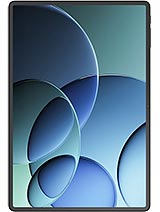
Iconia iM11
Iconia Duo D12
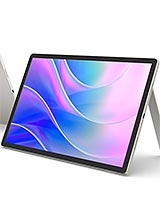
Iconia Duo S12
Iconia A16
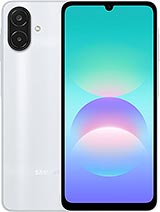
Galaxy A08 4G